Spring MVC: from JSP and Tiles to Thymeleaf |
|

When it comes to the view layer, Spring @MVC gives you a variety of choices. In this article, we will first discuss the way you have most likely used the view layer in the past few years: JSP. We will see the bad and better ways to work with them (plain JSP, JSP with custom tags, Apache Tiles).
We will then discuss a new project called Thymeleaf, which you can use as an alternate approach to JSP.
As usual, you can find all the code samples discussed in the corresponding application on github.
Plain JSP
Let us get started with the below code sample:
<html …> <body>
<div style="padding-top: 50px;">
<jsp:include page="../menu.jspx"/>
<c:choose>
<c:when test="${empty users}">
Table is empty.
</c:when>
<c:otherwise>
<table>
<thead>
<tr>
<th> First Name </th>
<th> Last name </th>
</tr>
</thead>
<tbody>
<c:forEach var="user" items="${users}">
<tr>
<td> <c:out value="${user.firstName}"/> </td>
<td> <c:out value="${user.lastName}"/> </td>
</tr>
</c:forEach>
</tbody>
</table>
</c:otherwise>
</c:choose>
<jsp:include page="../footer.jspx"/>
</div>
</body>
</html>
This code sample is not exactly “state of the art” in the sense that it could have been written 8 years ago in the exact same way. Does it mean that it is outdated? Let’s discuss some possible limitations.
1) The layout
We’ve used <jsp:include /> in order to include JSP fragments (header and footer). Obviously it’s good to have <jsp:include /> because it prevents you from doing a lot of copy/pasting. However, if you have hundreds of JSP files, you’ll find yourself copy/pasting those <jsp:include /> tags into all your JSPs. It would be better to externalize all layout information into a dedicated file.
2) Verbosity
Our users page is fairly small because it simply displays a list of elements. We already have 50 lines of code (the above code sample has been slightly reduced). You can imagine how big it would be if we had to display a lot of content.
3) HTML/CSS compliance
This page is not HTML/CSS compliant. Suppose a Web Designer has prototyped it, you would have to rewrite it completely in order to use intrusive JSP syntax. We’ll come back to that point when talking about ThymeLeaf.

JSP custom tags
Custom tags are part of Java EE. They allow you to externalize repetitive pieces of JSP without having to write a single line of Java. You instead create a dedicated .tagx file.
Here is an example:
<jsp:directive.attribute name="title" required="true" rtexprvalue="true" /> <body> <div style="padding-top: 50px;"> <jsp:include page="/WEB-INF/view/jsp/menu.jspx"/> <jsp:doBody /> <jsp:include page="/WEB-INF/view/jsp/footer.jspx"/> </div> </body>
In the sample application, this file is called mainLayout.tagx. It is there on my filesystem:
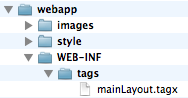
The most important instruction in the above sample is <jsp:doBody />. When the template is processed, <jsp:doBody /> is replaced with content from the “main” JSP.
Inside each JSP, I can invoke the previously created tag.
As you can see below, we are associating the custom namespace to our tags folder. We can then use the tag called mainLayout.
<div xmlns:c="http://java.sun.com/jsp/jstl/core" xmlns:jsp="http://java.sun.com/JSP/Page"
xmlns:custom="urn:jsptagdir:/WEB-INF/tags">
<custom:mainLayout title="${title}/">
<c:choose>
…
</c:choose>
</custom:mainLayout>
Note: as you can see in the above code sample, each JSP should specify the layout that it uses. If I have several layouts and I want to migrate several JSPs from mainLayout to customLayout, I would need to edit each of those JSP files and change the layout manually. We will come back to that point later when talking about Tiles.
Custom tags can do much more for you than just externalizing the layout part. To illustrate this point, I’ve created a simpleTable tag so I do not have to deal with <thead> and <tbody> tags. It also displays a message when the table is empty. My JSP file now looks like this:
<custom:mainLayout title="${title}/">
<custom:simpleTable collection="${users}" headerLabels="First Name, Last Name">
<c:forEach var="user" items="${users}">
<tr>
<td> <c:out value="${user.firstName}"/> </td>
<td> <c:out value="${user.lastName}"/> </td>
</tr>
</c:forEach>
</custom:simpleTable>
</custom:mainLayout>
You can browse simpleTable.tagx for a complete example.
Note: I should also mention a new project called Datatable4J created by Thibault Duchateau. It provides a set of tags on top of jquery-datatables and therefore allows to create AJAX-style datatables without having to write Javascript yourself. Documentation is pretty good and this project is actively worked on.
Pros and Cons
Standard Tags have many benefits:
- I can use them to do much more than just externalizing layout information. In the end, they can easily make your JSPs 5 times smaller than they would be otherwise.
- Eclipse/STS works well with custom tags so you’re able to use CTRL+space for auto-completion.
On the down side:
- Documentation is not the best.
- Even though custom tags are pretty neat already, I can’t recall any improvement to them in the past few years.
- Using Custom tags implies that you’re using a JSP Engine inside your web container. You can then expect some minor differences depending on the web container you’re using (Apache Tomcat, IBM Websphere, Oracle Weblogic…).
- It is also harder to Unit Test your view layer. You can see Spring MVC Test framework if you’re interested in this topic.
Externalizing your JSPs’ layout using Apache Tiles
Apache Tiles was already famous a decade ago for being the layout plugin that came with Struts 1. It now is an independent framework and integrates well with Spring MVC.
First of all, you should declare the appropriate Spring configuration:
<bean id="tilesViewResolver" class="org.springframework.web.servlet.view.tiles3.TilesViewResolver"/> <bean id="tilesConfigurer" class="org.springframework.web.servlet.view.tiles3.TilesConfigurer"> <property name="definitions"> <list> <value>/WEB-INF/view/jsp/tiles.xml</value> </list> </property> </bean>
In the below example, we are going to create 3 files as follows:
Layout file
As with JSP custom tags, the layout is described in a dedicated file. The syntax is quite similar, except that we are using the tiles tag library.
<html xmlns:tiles="http://tiles.apache.org/tags-tiles" …> <head> … </head> <body> <jsp:include page="/WEB-INF/view/jsp/menu.jspx"/> <tiles:insertAttribute name="main" /> <jsp:include page="/WEB-INF/view/jsp/footer.jspx"/> </body> </html>
layout.jspx
The most important instruction in the above sample is <tiles:insertAttribute />. When the template is processed, <tiles:insertAttribute /> is replaced with content from the “main” JSP. We will then use a dedicated file (typically called tiles.xml) which contains all the tiles definitions as follows:
<tiles-definitions>
<definition name="tiles/*" template="/WEB-INF/view/jsp/03-tiles/layout.jspx">
<put-attribute name="main" value="/WEB-INF/view/jsp/03-tiles/{1}.jspx" />
</definition>
</tiles-definitions>
tiles.xml
Based on the above example, the view “tiles/users” will be resolved as /WEB-INF/view/jsp/users.jspx using the template layout.jspx.
Inside the JSP, there is no mention of the layout it uses:
<div xmlns:c="http://java.sun.com/jsp/jstl/core" xmlns:jsp="http://java.sun.com/JSP/Page">
<table>
<thead>
<tr>
<th> First Name </th>
<th> Last name </th>
</tr>
</thead>
<tbody>
<c:forEach var="user" items="${users}">
<tr>
<td> <c:out value="${user.firstName}"/> </td>
<td> <c:out value="${user.lastName}"/> </td>
</tr>
</c:forEach>
</tbody>
</table>
</div>
The Apache Tiles approach is similar to custom tags and therefore has same pros and cons. There is some activity on the Apache Tiles project but it is definitely not as vibrant as ThymeLeaf which we will discuss in the next section.
Thymeleaf
Thymeleaf defines itself as an XML / XHTML / HTML5 template engine.
It is not based on JSPs but rather on some plain HTML files with a little bit of namespace magic.
First step: we should integrate ThymeLeaf with Spring. As usual, we need to declare the appropriate view resolver.
<bean id="templateResolver" class="org.thymeleaf.templateresolver.ServletContextTemplateResolver"> <property name="prefix" value="/WEB-INF/view/" /> <property name="suffix" value=".html" /> <property name="templateMode" value="HTML5" /> <property name="cacheable" value="false" /> </bean> <bean id="templateEngine" class="org.thymeleaf.spring3.SpringTemplateEngine"> <property name="templateResolver" ref="templateResolver" /> </bean> <bean class="org.thymeleaf.spring3.view.ThymeleafViewResolver"> <property name="templateEngine" ref="templateEngine" /> <property name="order" value="1" /> <property name="viewNames" value="thymeleaf/*" /> </bean>
Let us now consider a simple view page.
<html xmlns:th="http://www.thymeleaf.org">
<head>
<link th:src="@{/style/app.css}" rel="stylesheet"/>
</head>
<body>
<div th:if="${not #lists.isEmpty(users)}">
<table>
<thead> … </thead>
<tbody>
<tr th:each="user : ${users}">
<td th:text="${user.firstName}">John</td>
<td th:text="${user.lastName}">Smith</td>
</tr>
</tbody>
</table>
</div></body></html>
users.html
There are a few things that we can notice:
-This is an html file! You can actually preview it as a static file in your web browser. This feature is great for prototyping [1].
- We are using a dedicated namespace in order to turn static html pages into dynamic views. All parts that require dynamic processing are prefixed with “th:”.
- It’s simple to refer to the context path using ‘@{…}’. This is very easy to get wrong in plain JSPs [2].
- ${users} is resolved using Spring Expression Language. If I had a form, I would have used expressions such as *{user.name} to refer to form elements.
[1] We will not discuss prototyping any further in this article. However you can read this tutorial (http://www.thymeleaf.org/petclinic.html) if you would like to know more about it.
[2] In the first part of this article, when using <jsp:include />, I had to use a relative path “../menu.jspx”. This will lead to a broken link on the day I’ll move my JSP file to a different folder.
Layout file
Let us now discuss how to externalize the layout into a dedicated file.
As we did with JSP custom tags and with Tiles, you need to declare your layout file. In the code sample below, you will find 2 fragments:
- headerFragment contains all header information
- menuFragment contains my menu bar
Those names are not mandatory and I can have as many fragments as I wish.
In each view file, I can refer to fragments using th:include as follows:
<html xmlns:th="http://www.thymeleaf.org">
<head th:include="thymeleaf/layout :: headerFragment">
<!-- replaced with fragment content -->
<!—- 'thymeleaf/layout' refers to /thymeleaf/layout.html on the filesystem -->
</head>
<body>
<div th:include="thymeleaf/layout :: menuFragment">
</div>
<div th:if="${not #lists.isEmpty(users)}">
<table>
…
<tbody>
<tr th:each="user : ${users}">
<td th:text="${user.firstName}">John</td>
<td th:text="${user.lastName}">Smith</td>
</tr>
</tbody>
</table>
</div>
</body>
</html>
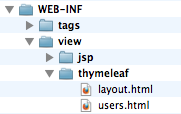
On the filesystem we have:
Pros and Cons
On the bright side:
- ThymeLeaf is a healthy open source project: new features coming up each month, good documentation, responsive user forums…
- It is the ideal template engine if you want your web designer to be able to read your view files
- The Expression Language used (actually called Standard Dialect) is much more powerful than JSP Expression Language.
- Unlike JSPs, Thymeleaf works well for Rich HTML emails (see http://www.thymeleaf.org/springmail.html).
On the down side:
- Thymeleaf does not have an equivalent to custom tags (.tagx files) yet.
- At this stage, ThymeLeaf is not compatible with JSP tag libraries.
Conclusion
We’ve seen the JSP and Thymeleaf approaches side by side. If your application uses hundreds of JSPs, we are not saying that you should ditch them all and start over again using Thymeleaf. However you might consider Thymeleaf for HTML pages outside of the web container such as for Rich HTML emails.
If you are starting on a new project, we strongly encourage you to compare both Thymeleaf and JSPs in order to figure out which one is more suitable to your needs.
Also, my colleague Rob Winch did a great presentation about modern templating options for Spring MVC. Besides JSP and Thymeleaf, it also discusses Mustache templates.
The sample app used for this blog entry is available on github.
Similar Posts
- Bringing new life to Spring Travel with Thymeleaf
- Spring Petclinic is on Github!
- Integrating Spring MVC with jQuery for validation rules
- Countdown to Grails 2.0: Static resources
- The future of functional web testing?


Grzegorz Grzybek says:
Added on October 30th, 2012 at 3:49 amThat's great you've written about Thymeleaf on SpringSource blog!
I'm actively using Thymeleaf since first Daniel Fernández' posts on Spring forum. Thymeleaf is successfuly being used in Polish Ministry of Justice and in other project. _Natural templating_ is a great feature which allowed me to prototype some pages and forms to create screenshots for project documentations and then they were directly used in working application!
The ability to create templates with styles and JavaScript which work both opened from file:// and in deployed application is very helpful!
That's true there are no "tag files", but there's something better (except lack of code completion for tagfile parameters in IDE) – you can create ONE template which contain ALL (or some) "custom tags" which them may be th:substitutedby in other templates. I have ONE "_controls.html" file which contain several "controls" (text, password, datetime (using jQueryUI's calendar), dictionary) – I'm referencing them across other templates and they work (jQueryUI, styles) after just opening "_controls.html" file in a browser – try doing it with JSP
Of course compiled JSPs are slightly faster than custom XML engine created by Daniel for Thymelead, but for majority of projects Thymeleaf should be the first choice of view technology! And it's working great with Spring MVC.
Thymeleaf is great library, but it's also something more – it's a missing piece in Enterprise Development – now JavaEE containers can provide Java Servlets implementation and leave view technology to someone more skilled and to something better than container-provided JSPs.
I'm succesfully using Thymeleaf in both embedded Jetty and on WebSphere 6 (in words: WebSphere SIX).
regards
Grzegorz Grzybek
Abhishek says:
Added on October 30th, 2012 at 5:24 amHi,
Great write up.
However, you mentioned it does not integrate with JSP's currently. I guess that means one can't use Spring Form Tag Libraries(http://static.springsource.org/spring/docs/current/spring-framework-reference/html/view.html)?
Daniel Fernández says:
Added on October 30th, 2012 at 6:23 amGrzegorz —
Thanks a lot for your kind words
Abhishek –
Thymeleaf has a specific Spring MVC integration package which includes complete Spring form integration (same features as the Spring Form Tag libraries, but provided by thymeleaf). This includes form-backing bean (command) integration, property editors, etc.
You can read more about Thymeleaf Spring integration at http://www.thymeleaf.org/documentation.html
Besides, there is a Thymeleaf dialect that offers you Spring Security integration, equivalent to SpringSecurity's tag libraries: http://github.com/thymeleaf/thymeleaf-extras-springsecurity3
Regards,
Daniel
Corby says:
Added on October 30th, 2012 at 7:24 amWow, thank you for another excellent article, Michael. I am attacking a site with hundreds of dynamic pages, and am attempting to address exactly these issues.
I am a big fan of encapsulating commonly used constructs like you did with the tag. That is a big focus of our work, in order to reduce page size and improve readability. It seems like that behavior is not supported in Thymeleaf?
Also, once you start encapsulating fragments with , that's not going to render as plain HTML, right? You basically lose the prototyping capability that makes Thymeleaf attractive once you do that?
test says:
Added on October 30th, 2012 at 7:28 am< tag &rt;
Corby says:
Added on October 30th, 2012 at 7:33 amUgh, tags did not render in my previous comment. I'll try again:
Thank you very much for another excellent article, Michael. I am currently attacking a site with hundreds of dynamic pages, and attempting to address exactly these issues.
I am a big fan of encapsulating commonly repeated components like you did with the <custom:simpletable> tag. This is a big focus of what we are doing, in order to reduce page size and improve readability. This functionality is not supported in Thymeleaf, correct?
Also, when you encapsulate fragments with <div:th>, I'm assuming that won't render in the browser. So by using this feature you will lose access to the prototyping capability that makes Thymeleaf attractive?
Michael Isvy (blog author) says:
Added on October 30th, 2012 at 7:36 am@Corby Thanx!
When using fragments in Thymeleaf, you still can provide a "mock" version of your header or footer in case the page is rendered statically. Of course you wouldn't do that for hundreds of pages because that would turn out to be very verbose.
But in general you only do prototyping for a few pages and then apply the same template to all the other pages on your website, so that should be ok.
Thymeleaf currently does not have such thing as tagx files. But I understand this is likely to be investigated in the mid-term.
Mark says:
Added on October 30th, 2012 at 8:20 amWith the movement towards "JavaScript clients", what would be the use-cases for using this technology versus something like YUI?
Daniel Serodio says:
Added on October 30th, 2012 at 8:35 amSounds very interesting, can Thymeleaf template files be stored outside the WAR file? That's a pretty bad limitation of JSPs.
Corby says:
Added on October 30th, 2012 at 8:40 amOnce minor note: I like using tag files even for non-dynamic content.
For example, instead of using <jsp:include page="/WEB-INF/view/jsp/menu.jspx"/>, I would use <myapp:menu/>
I find this more concise, and it eliminates the JSP path resolution issues you mentioned above.
Daniel Fernández says:
Added on October 30th, 2012 at 9:25 amDaniel Serodio — Yes, they can. Out-of-the-box, Thymeleaf allows your templates to be resolved from: 1. ServletContext (just like JSPs). 2. Classpath (for example, from inside a .jar file) or 3. Any file in the file system.
But this is customizable and you can create your own resolvers. I've even heard of users storing their templates on a database…
Neal says:
Added on October 30th, 2012 at 12:04 pmSeems a bit outdated.
The thought of using jsp is what keeps me away from springMVC.
Thymeleaf looks more yucky (and non-standard) than jsp
JSF(with primefaces) with spring backend seems the best choice out there for web apps.
Michael Isvy (blog author) says:
Added on October 30th, 2012 at 6:11 pm@Mark that's an interesting question. I don't have experience with JavaScript-based templating myself so I can't answer.
Jorge Simao says:
Added on October 31st, 2012 at 12:52 amGreat article, Mike! And good intro to thymeleaf..
The article is about two related but different things. JSP vs. Thymeleaf, and best-practices to view templating. I would have preferred two separated articles, otherwise the discussion becomes a bit interwinned.
You could also mention that you can make it better templating with JSP without custom taglibs (which is for more general use) or Tiles (with is made redundant when you have a MVC framework).
Just by using a different implementation of the view resolver:
http://www.jpalace.org/docs/articles/jsp-layout/JspTemplateViewResolver.html
Good work,
Jorge.
Ashley says:
Added on October 31st, 2012 at 1:56 amOne thing thymeleaf is missing right now is integration with spring theme.
Michael Isvy (blog author) says:
Added on October 31st, 2012 at 2:14 am@Ashley
that's a good point. I had a look into the Thymeleaf issues and saw that you've created an issue for that already.
https://github.com/thymeleaf/thymeleaf/issues/75
Mark says:
Added on October 31st, 2012 at 7:34 am@Neal – SpringMVC is more than just JSP/Thymeleaf. I am using it with Mobile "Native" and Browser JavaScript clients. I am still using Spring Services (injected into controllers) so for Desktop "native" and JSF clients I can just use that.
altumano says:
Added on November 1st, 2012 at 6:42 amThe Thymeleaf layout solution is not better than the Plain JSP.
It's the same "you’ll find yourself copy/pasting those tags into all your JSPs".
Instead, you should be able to define your page saying "use layout X with title Y".
altumano says:
Added on November 1st, 2012 at 6:47 amThe Thymeleaf approach reminds me of what early versions of Tapestry used. It was Tapestry 3 and 4, if I remember correctly. Ironically, it was "8 years ago"
Tapestry 5 also uses custom namespace, but on tag level instead of attribute level:
${current}
Anyway, Thymeleaf looks like a step in the right direction, good work !
Jorge Simao says:
Added on November 1st, 2012 at 8:40 amThat's a very good point @altumano.
What you are looking for them, is for a decorator based approach to templating as opposed to composite based approach.
You can see a discussion of the two kinds of approaches in here:
http://www.jpalace.org/docs/articles/jsp-layout/jsp-layout.html
A system using the decorator approach is SiteMesh:
http://wiki.sitemesh.org/display/sitemesh/Home
Which use a filter based implementation.
If you want a more efficient implementation that does not uses filters, thus no need to parse and rewrite the view in the output stream twice, and does not need Tiles or a custom taglib, is to use a templating view resolver that performs decoration in a MVC framework. See below how to do it:
http://www.jpalace.org/docs/articles/jsp-layout/JspTemplateViewResolver.html
(posted almost a year ago)
Cheers,
Jorge.
Daniel Fernández says:
Added on November 1st, 2012 at 1:06 pmaltumano — About the thymeleaf "layout solution"… if you prefer a "use layout X with title Y", Thymeleaf has a module for integration with Apache Tiles: http://github.com/thymeleaf/thymeleaf-extras-tiles2 In fact, you can even do Natural Templating (if you want) with Tiles, using Thymeleaf.
And of course, you can also use SiteMesh (because of its non-intrusive nature)…
nabedge says:
Added on November 2nd, 2012 at 4:19 amHi.
http://nabedge.blogspot.jp/2012/11/spring-mvc-from-jsp-and-tiles-to-mixer2.html
I suggest an another solution for view of springMVC !
Michael Isvy (blog author) says:
Added on November 2nd, 2012 at 6:53 am@Nabedge
this is an interesting approach, very different from what we've discussed here. Out of curiosity, how do you handle Javascript? Is that part of the HTML file as well?
Mark Spritzler says:
Added on November 2nd, 2012 at 9:25 amWell, I haven't used Thymeleaf, but a quick look at their website shows that it is a Java implementation of templating. Whereas ICanHaz.js is JavaScript and ICanHaz typically runs its rendering on the client side. With Thymeleaf if looks mostly like rendering on the server side and not in the browser at the client. However, Thymeleaf can also be used to do templating for anything anywhere, not just in a web environment. I might create a template for a text document and have it rendered with Thymeleaf in a standalone Java or Java Swing application. In those environments you wouldn't be able to use ICanHaz.js unless you have a js running in the JVM library like Rhino does.
As for more appropriate. If you already have server side rendering in your app with or without jsp pages, then I would recommend Thymeleaf. However, if you are just looking at templating, the big difference is if Thymeleaf renders in the server and what you are sending back to the client is the full rendered document. Whereas with ICanHaz, I only have to send the data to the client and then the client will render the document. So less traffic over the wire, which depending on your document, might be a lot less or more.
Personally, I don't want to be stuck in Servlet/JSP world anymore. I want pure HTML/CSS/Javascript which both a client javascript templating will give you as well as Thymeleaf. So I prefer the client side templating like ICanHaz.js But this them makes my Spring MVC application always a Spring REST MVC application, which I actually also really like better. Also, if you happen to be writing this type of application with say Spring Data JPA, then you can get your entire Spring REST MVC app created for you with Spring Data Rest.
Anyway just a few thoughts here.
nabedge says:
Added on November 2nd, 2012 at 6:09 pmMichael.
You can use inline javascript.
see: http://mixer2.org/site/faq.html
But the safe way is to use external javascript.
Jorge Simao says:
Added on November 3rd, 2012 at 5:01 amGreat initiative on Mixer2 @nabedge.
With this approach you are basically engineering the "component structure" of the view in Java to support templating. If the goal is make the life easier for the web developer, requiring to do lots of Java coding it seams to be a "step back" — going back to the early days before there were view descriptions languages (VDL) such as JSP, JSF, Tapestry, etc.
The view templating/decoration problem is almost trivial to solve in JSP (or any other VDL), if you look at the problem in right frame of mind.
The JSPTemplateViewResolver approach is simply to use path expressions in the includes of the template JSP file, such as:
and rendering always the template page rather then the main content page, and setting the value of the request scoped attribute "main" to the main content page.
You can even solve it without the JSPTemplateViewResolver. For example, in Spring MVC you can simply use the InternalResourceViewResolver, just by adding two lines of code to your handler methods, like this:
@Controller
class MyController {
public String myHandlerMethod(Model model, …) {
…
String selectedPage = … ; //the selected viewPage as usual
model.addAttribute("main", selectedPage); //extra line 1
return "templatePage"; //extra line 2
}
}
The proposed JSPTemplateViewResolver is simply doing this declaratively (thus more elegant coding, no code duplication, and separation of concerns), but as you seen it is not strictly essential.
If you want to check more features, such as setting the title of the rendered
page see the article above (URL copied below):
http://www.jpalace.org/docs/articles/jsp-layout/JspTemplateViewResolver.html
This is not to say that JSP is the ultimate solution to VDL (e.g. you may prefer something more "HTMLish"), but a comparable approach can also be setup in other VDL.
Cheers,
Jorge.
Neal says:
Added on November 4th, 2012 at 12:09 pm@Mark…as reply to
" SpringMVC is more than just JSP/Thymeleaf. I am using it with Mobile "Native" and Browser JavaScript clients. I am still using Spring Services (injected into controllers) so for Desktop "native" and JSF clients I can just use that."
Mark..
The only advantage I see with SpringMVC is the ability to expose yr services via REST. Front-end via SpringMVC is more pain as it does not accommodate any component technologies akin to JSF – and that is important as front-end is getting spiffier with all them rich-client solutions out there) It looks like a modified Struts to me(mind you I am not talking about Spring Webflow..but that is a complicated strategy to suit all phantom requirements)
Neal says:
Added on November 4th, 2012 at 12:11 pm@Mark…as reply to
" SpringMVC is more than just JSP/Thymeleaf. I am using it with Mobile "Native" and Browser JavaScript clients. I am still using Spring Services (injected into controllers) so for Desktop "native" and JSF clients I can just use that."
Mark..
The only advantage I see with SpringMVC is the ability to expose yr services via REST. Front-end via SpringMVC is more pain as it does not accommodate any component technologies akin to JSF – and that is important as front-end is getting spiffier with all them rich-client solutions out there) It looks like a modified Struts to me(mind you I am not talking about Spring Webflow..but that is a complicated strategy to suit all phantom requirements)
Jorge Simao says:
Added on November 4th, 2012 at 2:31 pmHi, Neal! Some good points…
But it also not absolutely true that you not have some sort support for rich front-end with JSP. You can use a third-party JSP taglib for rich controls, e.g.:
http://www.common-controls.com/en/index.php
or you can build your own taglib or tag file — possibly binding to a nice JavaScript lib, eg.:
http://www.jpalace.org/docs/articles/xpress/richweb-jsp-taglib.html
SpringMVC and other request-driven web frameworks (e.g. Struts1), are neutral about the view technology. Not to confuse the limited support in Spring Framework for client-side front-ends (e.g. really just the form taglib and Spring JavaScript mapping to Dojo), with the MVC abstraction. For its specific function (request-driven web framework REST framework), SpringMVC is a good framework.
For rich font-end client support, you should always consider using Spring MVC with third-party or custom solutions — without necessarily moving away from JSP.
This is not to say that JSP is always best. But its simplicity and consequent run-time efficiency, still deserves some respect even these days — non width-standing the more modern technologies.
)
Cheer,
Jorge.
Michael Isvy (blog author) says:
Added on November 6th, 2012 at 12:51 amHi,
.
I've updated the article to add a link to Datatables4J [1]. This is taglib abstraction on top of jquery datatable. I tried it out on a small personal project and I find it really neat. I just hope it could do more than just datatables
Unlike common-controls, this one is actively worked on.
[1] http://datatables4j.github.com/docs/index.html
Mark says:
Added on November 6th, 2012 at 7:17 amNeal, I understand what you are saying. While it might be "the only advantage", it is a very good advantage, especially if you are already using Spring for other things. The other thing to consider is Spring Security and how it all works together.
I see your point about "Struts", but only in that they are both MVC. SpringMVC is way better than Struts.
SpringMVC is not the right tool for every solution. But neither is JSF.
If the scope of your app is very narrow (not saying it is minor), then my previous post carries much less weight. But in today's world, that probably is seldom the case. Most times we don't see that is the case till are looking back (20-20 Hindsight). Sometimes we still don't see it.
YMMV.
Sanjay says:
Added on November 11th, 2012 at 9:32 amAs soon as UI markups lands up on the server side (Controllers as in the mixer2), the problem is that it looses the flexibility of change with a simple view change. I think being able to minimize coupling is a desired goal else for every piece of view changes both UX and backend engineers needs to be engaged.
Sanjay says:
Added on November 11th, 2012 at 9:33 amAs soon as UI markups lands up on the server side (Controllers as in the mixer2), the problem is that it looses the flexibility of change with a simple view change. I think being able to minimize coupling is a desired goal else for every piece of view changes both UX and back-end engineers needs to be engaged.
nabedge says:
Added on November 12th, 2012 at 4:49 pmHi Sanjay.
Thanks for your response. I understand what you say.
But I think that the reason for existence of server side UI technology like Apache Wicket.
Also, JavaScript – the client side technology – shows complex html output with complex script. (ex. the "wall" of Facebook)
One can change the view template simply with mixer2 because the template of mixer2 is 100% pure and xhtml.
Anyway, there is needs.
Sanjay says:
Added on November 12th, 2012 at 6:26 pmHi Nabedge
I was going through your blog and with something like this in the Controller,
Tbody tbody = html.getById("users",Table.class) .getTbody().get(0);
tbody.getTr().clear();
// embed user data
for (User user : userList) {
Tr tr = new Tr();
Td td1 = new Td();
Td td2 = new Td();
td1.getContent().add("Lady");
td2.getContent().add("Lady");
tr.getThOrTd().add(td1);
tr.getThOrTd().add(td2);
}
I could not understand if I were to change the "view template" say, as simple as replacing "table" with "div" can still work without changing the Java piece.
So I do not see mixer2 as a template based solution in my mind compared to JSP, Velocity, etc; which can purely work with a model.
Of course these have their own short-comings. In a perfect world probably most of the things will still play out well, but when you have resources of varying level of expertize in a big team, things tends to fall out of place pretty quick.
Nonetheless, mixer2 was unknown to me; so thanks for sharing that anyway.
Fabio says:
Added on November 16th, 2012 at 1:55 amHi Michael,
how do you compare these templating approaches with a css solution such as the one that you have documented here http://blog.springsource.org/2012/08/29/integrating-spring-mvc-with-jquery-for-validation-rules ?
What are the pros and cons of a solution that simply use bootstrap and do not use any template systems ?
Regards
Fabio
Michael Isvy (blog author) says:
Added on November 16th, 2012 at 7:47 am@Fabio: in the other blog entry you mentioned, I purposely didn't use a templating solution because I wanted to keep the code as simple as possible so we could concentrate on validation rules. But I did have to do some copy/paste so it wouldn't be ideal in real life.
If your application is super simple, I guess you can do without a templating solution. If you have more than a dozen of views, it's probably better for you to use a templating framework. Just picture yourself having to change completely the design of your website. It usually goes beyond CSS and will be much easier if you used a templating framework from the beginning.
Cheers,
Michael.
Art says:
Added on November 16th, 2012 at 8:08 amin your old JSP cold, [td] ${user.firstName} [/td] is vulnerable to HTML injection – you should point out that the thymeleaf approach mitigates this
(The old JSP code should be using c:out)
Daniel Fernández says:
Added on November 16th, 2012 at 11:20 amArt – You are right, that's a good point. The lack of escaping in JSP Expressions is in fact documented as a vulnerability by OWASP: https://www.owasp.org/index.php/J2EE_Bad_Practices:_JSP_Expressions
Thymeleaf always escapes "th:text" output. In order to output unescaped text, you have to explicitly use the "th:utext" attribute (for "unescaped text").
Regards,
Daniel.
Michael Isvy (blog author) says:
Added on November 18th, 2012 at 5:58 am@Art, Daniel: thanks for letting me know. I've updated the code samples accordingly.
Yuan Ji says:
Added on November 19th, 2012 at 10:04 amThank you Michael for this wonderful post. I migrated my project from JSP to Thymeleaf, and the result is excellent. I feel other open source projects recommended by SpringSource developers are always amazingly good. I will try DataTables4J later. Please keep up the good work!
Regards,
Yuan
Michael Isvy (blog author) says:
Added on November 19th, 2012 at 5:25 pm@Yuan I have read your blog entry and I feel that I could have written it myself
. I had exactly the same experiences as you about Bootstrap and jspx.
Are you ok for me to add a link to your blog entry in the conclusion part of this article?
Michael.
alamgir nhossain says:
Added on November 25th, 2012 at 8:31 pmThank you for useful information. It is exactly what I needed. I managed to get here everything that I need for my article. Applause for a author.Best regards:spss assignment help
Michael Isvy (blog author) says:
Added on January 1st, 2013 at 8:44 pmHi,
in case you guys are interested, I've just migrated the sample project to Spring 3.2 and Tiles 3.
Cheers,
Michael.
Thibault Duchateau says:
Added on January 21st, 2013 at 12:13 amHi,
Thanks for mentioning the project Michael !
For information, DataTables4j is now compatible with Thymeleaf !
The latest release (0.8.1) introduces a new Thymeleaf dialect, allowing you to add basic features to your table, as pagination, sort, filter but also export and themes.
At the moment, there are more options in the JSP taglib than in the Thymeleaf dialect but more will added over the time.
http://datatables4j.github.com/docs/
Regards,
Thibault
Tarek says:
Added on February 13th, 2013 at 4:46 amHi Micheal,
In your response to @Fabio you mentioned that a drawback of doing without a templating engine is that you wouldn't have an easy way of changing the layout of your website.
However, there are some frameworks like AngularJS which allow you to use a tiles-like approach without using a templating engine. When using such frameworks, the server side is restricted to a set of web services (JSON over HTTP).
What do you think of such an approach?
Michael Isvy (blog author) says:
Added on February 13th, 2013 at 8:59 amHi Tarek,
that seems very interesting indeed. However I don't have much experience with AngularJS and similar JS frameworks myself so I can't really help there.
In any case, I understand we're not talking about templating only but about a very different way of working with the web layer.
Cheers,
Michael.