Blogs

SpringSource Blog

Upgrading Maven integration for SpringSource Tool Suite 2.8.0

Andrew Eisenberg

UPDATE, Nov 23: We have released STS 2.8.1, that fixes many of the install/uninstall of m2eclipse issues that people were having. Read the release announcement. Now, it is possible to upgrade/downgrade m2eclipse easily. STS 2.8.1 fully supports both versions of m2eclipse.

Today, we released version 2.8.0 of the SpringSource Tool Suite. Along with an update to Eclipse Indigo SR1 (which brings you full IDE support for Java7), we also updated the Maven integration from the old and unmaintained m2eclipse versions 0.12.x to the latest version m2e 1.0 – which is now shipping as part of the Eclipse release train. The STS 2.8.0 packages come with m2e 1.0 and several compatible add-ons (project configurators) pre-installed. We have also implemented a migration assistant that helps the upgrading your existing projects to the new m2e version. This migration assistant will convert the classpath, builder and project nature of all legacy Maven projects to be m2e 1.0 compatible. It will not update old launch configurations or project/workspace settings. These will need to be migrated by hand.

Unfortunately, upgrading an existing STS 2.7.x (or older) installation requires some extra work. First, follow the instructions on the "Update Site Installation" section of the Installation Instructions document. After updating to 2.8.0, the m2e migration assistant will be invoked even if you have not upgraded to m2e v1.0 yet. It is best to hold off on migrating until after upgrading to m2e v1.0. No long term damage will occur to your projects, but they will not be able to be built until you complete the upgrade process described below.

Uninstall the existing m2e 0.xx components

  1. Start your STS (preferably with an empty workspace to avoid confusion with existing projects
    that use m2eclipse 0.12.x).
  2. Go to the "About" dialog and click on "Installation Details".
  3. In the 'Installed Software' list that opens, select the org.maven.ide.eclipse.* and the org.sonatype.* entries. More specifically, there should be five:
    • "Maven Integration for AJDT (Optional)":
      id=org.maven.ide.eclipse.ajdt.feature.feature.group

    • "Maven Integration for Eclipse (Required)":
      id=org.maven.ide.eclipse.feature.feature.group

    • "Maven Integration for WTP (Optional)":
      id=org.maven.ide.eclipse.wtp.feature.feature.group

    • "Project configurators for commonly used maven projects (temporary)":
      id=org.maven.ide.eclipse.temporary.mojos.feature.feature.group

    • "Tycho Project Configurators":
      id=org.sonatype.tycho.m2e.feature.feature.group

    Maven features to uninstall

  4. Press "Uninstall"
  5. Restart STS (again, preferably with the empty workspace)

Install the new m2e components
Now we will install the new m2e 1.0 support from the Extension install including a number of
add-ons that are compatible with that m2e version. We recommend installing from the dashboard instead of installing directly from the update site since installing from the dashboard will automatically install many commonly used project configurators (so that you won't have to do that yourself later).
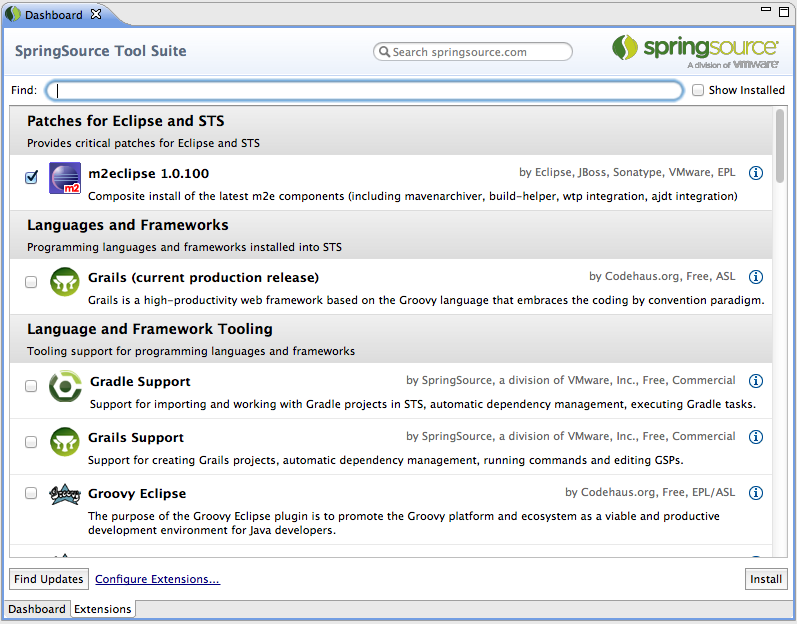
  1. Open the Dashboard and select the Extensions tab.
  2. Select the m2e 1.0.100 composite install and press "install"

    Installing Maven from the dashboard

  3. Restart STS

Uh oh…my projects no longer build
After restarting STS, you may see that some of your maven projects no longer build and that they have errors in the pom.xml files like this:
Plugin execution not covered by lifecycle configuration

Do not panic. Starting with version 1.0, m2e has become significantly more strict as to how maven plugins can be run inside of Eclipse/STS. In order for a maven plugin to be run as part of a project build or configure inside of Eclipse/STS, there must be an associated Eclipse plugin (called a project configurator) that manages the execution of the Maven plugin.

There is an easy fix for this. Go to Preferences -> Maven -> Discovery and click "Open Catalog". This will allow you to browse all available m2e project configurators. Look for the configurators that apply to the errors that you are seeing and install them.

If you are still seeing problems or have any questions at all, please comment on this blog or at the STS forums. We will be happy to help.

EDIT (October 21)

Thanks for all the feedback everyone. I have gathered some FAQs and put into a forum post here:

http://forum.springsource.org/showthread.php?116189-STS-2.8.0-and-m2e-FAQ

Also, we are looking at how to improve STS's maven support in the future, and we are gathering feedback from users. Please comment.

Similar Posts

Share this Post
  • Digg
  • Sphinn
  • del.icio.us
  • Facebook
  • Mixx
  • Google Bookmarks
  • DZone
  • LinkedIn
  • Slashdot
  • Technorati
  • Twitter
 

87 responses


  1. Panic this afternoon (Madrid, Spain: GMT 1) after updating from the dashboard.

    Tomorrow will try to fix the problems. Let's see this "project configurators" (as I 've read recently, maven doesn't suck, but our pom does)

    Thanks for the POST.

    Greetings.


  2. All of our projects are using gmaven plugin and no "project configurator" => many uncovered plugin exectutions.
    I guess solution is to move to maven-compiler-plugin…

    Regards


  3. @Javier – good luck! Let us know if you have any problems.

    @ch4mp – Although I would recommend moving to the maven-compiler-plugin and using groovy-eclipse-compiler, installing the Groovy-Eclipse configurator should work. Go to Help -> Install new software. Find the entry for Groovy-Eclipse and install "Groovy-Eclipse m2e integration".


  4. This break is just too disruptive. What is needed is a fully automated upgrade mechanism so that everything "just works" after upgrade to STS 2.8. All our existing POMs give lots of errors, with no simple way to resolve (not nearly enough configurators/connectors available on the update site).
    The bottom line is we will have to revert to STS 2.7 until these issues are resolved.
    This is a great shame, I was really looking forward to Java 7 support…


  5. This is just way too disruptive. All of our existing POMs exhibit numerous errors, with apparently no configurators available on the update sites. We will have to revert to STS 2.7 until everything "just works" after upgrading to STS 2.8.
    This is a real shame, the Java 7 support was much anticipated…


  6. @aardvark I am sorry that you are having difficulty with this upgrade. We have tried our best to make the upgrade easy and we are here to help with specific problems. But because of the vast differences between the old m2eclipse and the new m2e, there can be no completely automated upgrade process. If you can post some of your pom errors here or on the STS forum, we can help you find a solution for them.


  7. After upgrading to 2.8 and uninstalling the m2e 0.10, I restarted my STS. I went to the extensions tab, but I don't see any m2eclipse patch.

    Where in the world did it go? How am I supposed to put it back now?


  8. This break is just too disruptive. What is needed is a fully automated upgrade mechanism so that everything "just works" after upgrade to STS 2.8. All our existing POMs give lots of errors, with no simple way to resolve (not nearly enough configurators/connectors available on the update site).


  9. Tomorrow will try to fix the problems. Let's see this "project configurators" (as I 've read recently, maven doesn't suck, but our pom does)


  10. @Mark
    I don't know why you wouldn't be seeing the m2e extension on the extensions page. But, you can install it directly through this update site:
    http://download.eclipse.org/technology/m2e/releases

    Also, you will probably want the AspectJ project configurator, available here from this update site:
    http://dist.springsource.org/release/AJDT/configurator/

    Add these two update sites to your Eclipse install manager and you should be able to install m2e.


  11. @Andrew, I keep getting a 404 whenever I try both links. Anyway, I've Googled and found http://m2eclipse.sonatype.org/sites/m2e and installed 0.12 on top of STS 2.8.

    Everything works as before except whenever I restart my STS I'm advised to upgrade my existing Maven projects after I upgrade to m2e 1.0 which doesn't exist in the extensions tab nor on the links you've provided.


  12. My report:

    A new fresh installation is the best solution. It comes with maven, eGit and all the stuff I need for my daily work.

    "Importing existing projects into workspace" worked well for me.

    But I presume Springframework/VMWare wants to conquer the world, because I used a Roo project, and after some annoying warning and errors (I simply "OKed" all of them) AND a Right click -> Maven -> Update project configuration (because the applicationContexts have errors :| ), it worked:

    [INFO] ——————————————
    [INFO] BUILD SUCCESS
    [INFO] ——————————————
    [INFO] Total time: 48.090s
    [INFO] Finished at: Wed Oct 19 09:36:38 CEST 2011
    [INFO] Final Memory: 8M/32M
    [INFO] ——————————————

    Note: this is a Roo message, from the Roo view within the STS:
    roo> perform tests

    We've been done this because a lot of problems arose trying to fixing the 2.7.2 installation that was updated (not only with MAVEN, but with aspects too)

    My recommendation: don't upgrade if you can avoid to.


  13. Extended report after importing 3 Spring Roo projects:

    > Right click -> Import… -> Existing projects into workspace

    · Select root directory
    · Copy projects into workspace (just in case..)

    > A warning for the project, that won't compile until it's upgrade to M2E v1.0 appears. Click YES to upgrade now (instead of doing later by going to: Project -> Configure -> Convert legacy Maven Projects…)

    > The aplicationContexts don't compile: Right click on the project -> Maven -> Update project configuration…

    It successfully builds the project and open the Roo shell (take care of having previous Roo version if you project need so)

    roo> perform tests
    [INFO] Scanning for projects…

    [INFO] ——————————————
    [INFO] BUILD SUCCESS
    [INFO] ——————————————
    [INFO] Total time: 2:12.241s
    [INFO] Finished at: Wed Oct 19 10:59:47 CEST 2011
    [INFO] Final Memory: 8M/75M
    [INFO] ——————————————


  14. Suddenly I can't load my page, and the root cause error reads:

    java.lang.LinkageError: loader constraint violation: when resolving interface method "javax.servlet.jsp.JspApplicationContext.getExpressionFactory()Ljavax/el/ExpressionFactory;" the class loader (instance of org/apache/jasper/servlet/JasperLoader) of the current class, org/apache/jsp/WEB_002dINF/layouts/default_jspx, and the class loader (instance of org/apache/catalina/loader/StandardClassLoader) for resolved class, javax/servlet/jsp/JspApplicationContext, have different Class objects for the type javax/el/ExpressionFactory used in the signature

    This is my first stab at anything Java, so I don't really have much intuition about what this message is trying to tell me. All I know is, it started immediately after upgrading STS.


  15. @Dan, which page are you talking about? Is this problem in STS or in one of your applications that you are developing? Do you have a full stack trace?


  16. @Mark, when are you getting a 404 error? Are you putting those urls directly into your browser? If so, that is expected. These are Eclipse p2 update sites and there is no index.html file and hence nothing to look at if you navigate to them in a browser. If you paste them into your Update manager Help -> Install new software…, then it should work.

    But, it looks like you found a workaround. The old version of m2e is no longer supported and may cause difficulties when creating certain kinds of projects.


  17. Hi,

    After following your upgrade instructions, all my pom.xml files have the "Plugin execution not covered by lifecycle configuration" error. I tried getting m2e project configurators but it didn't find any extensions. I seem to be stuck. Any suggestions?

    Thanks,

    – Gary


  18. @Andrew — Thanks, but I appear to have sorted it out. Not totally clear how, but I followed Javier's instructions and my web app runs now.


  19. Any chance that STS will be taking care of providing a patch for this m2e issue related to the "Plugin execution not covered by lifecycle configuration" error?
    https://bugs.eclipse.org/bugs/show_bug.cgi?id=350414
    This is currently a showstopper for me for upgrading to 2.8, as I can't change existing pom files just to make m2e happy.


  20. It happens to me only one weird thing: the previous STS 2.7.1 has no longer "Springsource components"

    I mean, I can't see the Spring perspective or the spring servers or something provided by Spring anymore.

    I don't know if it's related to the new STS 2.8.0 installation (that I did in a separate directory, of course, and I use a new workspace, just in case, you know)

    As long as I can configure the Spring projects in the new STS, I don't care (but I'm a little bit surprised)


  21. I'm on Eclipse 3.7.1, Maven Integration for Eclipse 0.12.1, and STS 2.7.2. I don't have the other four Maven plugins specified above.

    I assume that I first have to uninstall Maven Integration for Eclipse 0.12.1. When I did this, it failed with the following:

    An error occurred while uninstalling
    session context was:(profile=epp.package.jee, phase=org.eclipse.equinox.internal.p2.engine.phases.Uninstall, operand=[R]org.maven.ide.eclipse.editor 0.12.1.20110112-1712 –> null, action=org.eclipse.equinox.internal.p2.touchpoint.eclipse.actions.UninstallBundleAction).
    Error while loading manipulator.
    Error while loading manipulator.

    The detail from the .log file:

    !ENTRY org.eclipse.equinox.p2.engine 4 4 2011-10-19 08:41:11.312
    !MESSAGE An error occurred while uninstalling
    !SUBENTRY 1 org.eclipse.equinox.p2.engine 4 0 2011-10-19 08:41:11.312
    !MESSAGE session context was:(profile=epp.package.jee, phase=org.eclipse.equinox.internal.p2.engine.phases.Uninstall, operand=[R]org.maven.ide.eclipse.editor 0.12.1.20110112-1712 –> null, action=org.eclipse.equinox.internal.p2.touchpoint.eclipse.actions.UninstallBundleAction).
    !SUBENTRY 1 org.eclipse.equinox.p2.engine 4 0 2011-10-19 08:41:11.312
    !MESSAGE Error while loading manipulator.
    !STACK 0
    java.lang.IllegalStateException: Error while loading manipulator.
    at org.eclipse.equinox.internal.p2.touchpoint.eclipse.LazyManipulator.loadDelegate(LazyManipulator.java:63)
    at org.eclipse.equinox.internal.p2.touchpoint.eclipse.LazyManipulator.getConfigData(LazyManipulator.java:107)
    at org.eclipse.equinox.internal.p2.touchpoint.eclipse.actions.UninstallBundleAction.uninstallBundle(UninstallBundleAction.java:74)
    at org.eclipse.equinox.internal.p2.touchpoint.eclipse.actions.UninstallBundleAction.execute(UninstallBundleAction.java:32)
    at org.eclipse.equinox.internal.p2.engine.ParameterizedProvisioningAction.execute(ParameterizedProvisioningAction.java:35)
    at org.eclipse.equinox.internal.p2.engine.Phase.mainPerform(Phase.java:149)
    at org.eclipse.equinox.internal.p2.engine.Phase.perform(Phase.java:78)
    at org.eclipse.equinox.internal.p2.engine.PhaseSet.perform(PhaseSet.java:44)
    at org.eclipse.equinox.internal.p2.engine.Engine.perform(Engine.java:75)
    at org.eclipse.equinox.internal.p2.engine.Engine.perform(Engine.java:44)
    at org.eclipse.equinox.p2.operations.ProvisioningSession.performProvisioningPlan(ProvisioningSession.java:174)
    at org.eclipse.equinox.p2.operations.ProfileModificationJob.runModal(ProfileModificationJob.java:79)
    at org.eclipse.equinox.p2.operations.ProvisioningJob.run(ProvisioningJob.java:177)
    at org.eclipse.core.internal.jobs.Worker.run(Worker.java:54)


  22. @Gary, What plugins have the error marker?


  23. I'm in the same boat, where m2e does not show on the extensions page; note that for some reason, I didn't have all 5 prior maven packages to remove — so I removed the ones I did have.

    Currently going to http://download.eclipse.org/technology/m2e/releases to get the m2e directly (just wish I could do so from the extensions tab).


  24. @Marcello, Regarding https://bugs.eclipse.org/bugs/show_bug.cgi?id=350414

    This is the first that I have seen this bug and I agree that something must be done. We are currently trying to contribute the m2e migration assistant that we created back to the m2e project, but we are not having much interest (see here https://bugs.eclipse.org/bugs/show_bug.cgi?id=360861). And so we need to see what becomes of this patch before we try to contribute more code that is potentially much more complicated.

    In the meantime, can you let me know which plugins are showing the error marker?


  25. @David Karr,

    It looks like you might be hitting this bug: https://bugs.eclipse.org/bugs/show_bug.cgi?id=277242

    It looks like there is some inconsistency between your OSGi metadata and your p2 metadata. Rather than exploring further, it might just be easier to install a fresh 2.8.0.


  26. By "fresh 2.8.0" you mean I have to reinstall Eclipse, STS, and all of my other plugins, and then reimport all of my preferences and other settings?


  27. I'm suggesting downloading STS 2.8.0 from the website as a zip and unzipping. Yes, you would have to reinstall any non-default STS plugins.

    There may be an easy workaround for your previous problem, but to find that workaround may take longer than to just start from scratch.

    However, if you do not want to start from scratch, here is what I would recommend doing:

    1. Revert your Eclipse configuration to something earlier, when you were in a known good state. Go to Help -> About -> Installation Details -> Installation history
    2. Try uninstalling m2eclipse again.

    To tell you the truth, I don't exactly know what your problem is and so that is why I am suggesting starting from scratch, but there may be a solution that I am not aware of.


  28. For those of you who are not finding m2e on the extensions page, here is what the problem seems to be:

    1. Ensure that the old m2eclipse is uninstalled
    2. Ensure that you have upgraded to 2.8.0 completely

    If you have not done this, then m2e will not show on the extension page. If you have done this, but m2e is still not showing on the extension page, then I am not sure what is happening. I'd recommend installing m2e directly from the update site, here:

    http://download.eclipse.org/technology/m2e/releases


  29. I tried to update my STS unfortunately I encountered problems when searching for m2e on Dashboard Extension. I do it on different way, go to (Help – Install New Software – then add the update site of m2e which is now on eclipse.org "http://download.eclipse.org/technology/m2e/releases") then select the "Maven Integration for Eclipse" – next next accept finish. Restart your STS.

    After restarting the STS, I switch my workspace to my old workspace and you will see that the "M" indicator for Maven is missing then a pop-up display that says "convert your legacy maven blah blah…" of course yes. After converting it you will see now the "M" on your Project icon which means it was successfully converted. Just to make sure if your project was converted, restart your STS and then you will not see the pop-up message again.


  30. I installed a fresh 2.8.0.
    When trying to create a Tomcat-server to let my Roo-project run on it says

    "The server does not support version 3.0 of the J2EE Web module specification."

    I can't use Tomcat 7 yet so what am I supposed to do now?


  31. Use the http://download.eclipse.org/technology/m2e/releases and install it using the old way. Help – Install New Software – Add. Then add the update site then select Maven Integration for Eclipse then install it.

    After installing it you will see the "M" indicator is missing which means for "Maven". Or if you're not on your old workspace, just switch to that workspace and then a pop-up message that says convert legacy maven… Just convert it and then after converting, the "M" indicator will appear on your project icon.


  32. @Andrew, thanks for the reply. I'm able to update now using those two links by pasting the URLs directly to the Install New software tab. Earlier I got a 404 error because I pasted them directly to the browser. I thought that was what you meant earlier. Sorry for the miscommunication.

    I'm installing the AspectJ project configurator now. But I'm wondering why it's version 0.13. I was expecting both updates are on 1.0? Anyway, I'm upgrading and verifying now my existing Maven projects


  33. @Andrew, I'm reverting back to 0.12 m2e. My Maven projects are not building. m2e is suggesting me to search for m2e connectors. It found one for the buildhelper but it didn't solve whatever problem it's trying to fix.

    Unfortunately, the affected areas are plugins and their lifecycles. It has nothing to do with my code. And another unfortunate thing is my projects won't compile. The tests won't run. That's when I decided this update is bad.

    Also, take a look at this blog detailing a similar bad experience: http://grumpyapache.blogspot.com/2011/08/mess-that-is-m2e-connectors.html


  34. @David Karr,

    When I said "a new fresh installation" I meant to download and install STS 2.8.0 as the first time (in a new installation directory)

    Installing the plugins again it wasn't an issue for me, since STS 2.8.0 includes everything I work with.

    I only had to install Subversive (I hate subversion, but we use it in the company. However, STS includes eGit) and Gradle (just for fun) and not many more. All from the Dashboard. Plus, SQLExplorer from the URL.

    Apart from my problem with the previous STS 2.7.1, everythings went well.

    Note: to enable Maven in a new project, since there is no m2eclipse entry, right click on the project -> Configure -> convert to Maven project.

    Then, the Maven entry in the right click will appear.


  35. @Andrew Eisenberg: it happens when the pom contains any maven plugin which is not available in the m2e lifecycle mappings directory (I can count less than 20 from Preferences->Maven->Discovery->Open Catalog – Lifecycles checkbox), in my case it was maven-antrun-plugin running the hibernate bytecode instrumentation – I agree that also your patch would be very useful and I added myself in CC as I don't see any way to vote on m2e's bugzilla


  36. @Mark, if you can't find a connector for a particular maven plugin, then you should just disable it in the build. At the very least, this will allow you to build your maven project even if some plugins are disabled when run inside of Eclipse. Did you revert back to STS 2.7.2 or just to the old version of Maven? If just to the old version of Maven, please let us know if you have any difficulties with that.

    @Ray, thanks for your description of how you got things working.

    @Marcello, connectors that are already installed will not show up in the catalog. And we have pre-installed several ones that are commonly used. So, there are more than 20 (but perhaps less than 30).

    Here is some more useful information on what to do with the execution not covered error:

    http://wiki.eclipse.org/M2E_plugin_execution_not_covered


  37. I did a fresh install instead of an upgrade. We have dozens of maven projects making up our system that use the cxf-codegen-plugin which generates code from wsdl and places it under /target. This worked well with m2eclipse (selecting all projects and clicking Maven->Update Project Configuration would do the trick). This does not work with m2e – the code is generated but never added to the Eclipse project build paths. I have 132 broken projects now.


  38. There is no m2e project configurator for cxf-codegen-plugin.


  39. There is no m2e project configurator for the cxf-codegen-plugin.


  40. @Gary,

    For the cxf-codegen-plugin, can try to execute the plugin goal? See here:

    http://wiki.eclipse.org/M2E_plugin_execution_not_covered#execute_plugin_goal

    For each of the errors on the cxf plugin reference, first do the quick fix to ignore it, and then change the to . Try it in one of your projects first. And if it works, you can do it in all of your projects. I wish i had a better solution for you.


  41. Thanks Andrew, I will give it a try again when I have some more time and let you know. Had to go back to previous release to get some work done today..


  42. Hey Alim,

    regarding your problem with the Roo application on Tomcart, I guess we should move the discussion to the forum, ok? This blog post is very much dedicated to the Maven Integration issues that people are facing.

    Aside of that I tried a fresh STS 2.8.0 install, created a Roo project, executed the vote.roo script and deployed the app successfully in Tomcat 6 and Tomcat 7. Can you provide me with more details how you got to this error message? (at the forum) That would be great.

    Thanks,
    Martin


  43. How do I know which version of eclipse is my STS working with?

    I had long time without running my STS. So today I ran it and performed a 'BIG' updating of STS plus all the plugins and stuff.

    Now, STS is on the 2.8.0 version but going to About/ then click the eclipse.org icon, the version says: (I supposed the current version for indigo was 3.7.1)

    -Eclipse Platform
    Version: 3.6.2.r362_v20110210-9gF78Gs1FrIGnHDHWkEcopoN8AmxeZflGDGKQi
    Build id: M20110210-1200

    -Eclipse Java Development Tools
    Version: 3.6.2.r362_v20101117-0800-7z8XFW6FLFlmjJcvz03jyeFBLS_F
    Build id: M20110210-1200

    Do I need to update my eclipse? How do I do that?

    Thanx


  44. @dmp, you can install STS 2.8.0 onto Eclipse 3.6, which is what you did. You are still running on Eclipse 3.6.2, but you have installed the bits for STS 2.8.0.

    It should be possible to upgrade to Eclipse 3.7.1, but you must add the Indigo update site:
    http://download.eclipse.org/releases/indigo

    Then run a "Check for updates". Upgrading to the next version of Eclipse is always dicy and it may fail for some reason. I would recommend downloading a fresh version of 2.8.0 instead.


  45. Hi,

    Is there another way to get stuff from the catalog? I have a bunch of osgi related plugins.

    The catalog appears to be empty when I hit it from Maven->Discovery – I get a warning that it is empty and to check my network connection (which is fine).

    Building is working from the command line though – so I'm not blocked.

    Regards,
    Jon


  46. @jon court,

    You might be able to find some configurators in the eclipse marketplace client, which is installed into STS by default. Help -> Eclipse marketplace.

    I think you want the Tycho configurator.


  47. I just reverted back to the old m2e version but my STS is upgraded to 2.8 STS.

    After reverting back, whenever I right-click on any project and select Maven my menus are displayed twice. Luckily my projects are under SVN. So using revert, it changed back my Eclipse settings for each project.

    Everything works fine but from time to time that ugly m2e side-effects are showing, i.e I get a null error in my pom.xml. I don't know the exact error because it only shows null whenever I point my mouse on it. To fix it, I just delete it in the Markers window.


  48. What a disaster. I can not believe that such a radical change like this made it into the wild. Granted, there are probably several good reasons for trying to fix the plugin (like builds within eclipse/STS taking *huge* amounts of time) but to break compatibility is inexcusable.
    We have dozens of maven projects, and almost every POM is now broken within STS/eclipse. I appreciate it's the m2e folk rather than Springsource, but we really need some way to fix this. Editing all those POMs is not an option.


  49. Hi,

    I've tried everything, upgrading to version 2.8 and a clean install of 2.8, but I can't seem to fix errors in my pom.xml files. Unfortunately, I'm going to have to go back to 2.7 so I can get some work done. Does anyone know where I can find the STS 2.7 download? I can't find it on the download page.

    Thanks,

    – Gary J.

    P.S. I still love Spring and the STS IDE. One bad upgrade experience won't change that fact.


  50. Hello @aardvark

    Apologies if you think I'm interfering your conversation with the Spring team.

    But an update from a version 0.12 to a version 1.0 sounds to be necessary. At least to improve the performance and to avoid a lot of known issues (I can't checkout Maven projects from SCM since a long time ago)

    Please, don't you feel insulted, because I'm trying to be kindly: I recommend you to use a source repository (GIT if you can, Subversion ain't bad)

    What I mean with this reply is that this kind of arguments avoid step forward applications. With time, they become extremely hard to maintain, and worst, very slow to modify.

    My suggestion is: make a new fresh install of STS 2.8.0 and checkout your projects from your repository. Evaluate whether or not a project deserves a change in the pom, and revert the changes if it's not the case.

    The projects that you don't change can be edited using STS 2.7.2.

    BUT, if a compiler is telling you that a change is necessary, maybe the code is incorrect, and not the compiler.

    One more time, apologies for bothering you.


  51. For those looking for older "stable" versions, you can visit http://www.springsource.com/downloads/sts.

    Previous versions that really worked for me are:

    springsource-tool-suite-2.7.2.RELEASE-e3.7
    springsource-tool-suite-2.6.1.SR1-e3.6.2

    If you're going to try 2.8, I suggest downloading and installing it FRESH. Then "TRY" out your existing Maven projects with it. Don't mess with your existing STS installation which I DID. It was a bad decision. My existing projects are behaving erratically after the upgrade.

    The projects worked with a FRESH installation of 2.8 with the caveat that you have to IGNORE some of your Maven plugins. If you're upgrading from 2.6 or 2.7, even selecting the IGNORE will behave erratically. So do yourself a favor. Install FRESH!


  52. Thanks for all the feedback everyone. I have gathered some FAQs and put into a forum post here:
    http://forum.springsource.org/showthread.php?116189-STS-2.8.0-and-m2e-FAQ

    I hope this helps.

    Also, we are looking at how to improve STS's maven support in the future, and we are gathering feedback from users here:
    http://forum.springsource.org/showthread.php?116188-Are-you-in-m2e-upgrade-hell-Feedback-sought

    Please comment.


  53. Hi there…

    I cant find any connector for org.codehaus.mojo:buildnumber-maven-plugin:1.0 so I still get the "Plugin execution not covered by lifecycle configuration" error, any ideas?


  54. As described in the FAQ, http://forum.springsource.org/showthread.php?116189-STS-2.8.0-and-m2e-FAQ you should use the provided quickfix to mark that plugin as ignored. And when you need to invoke the functionality that the plugin provides, you should drop to the command line and invoke mvn directly.


  55. Please help.

    I did a fresh install of STS 2.8 for windows 7 using the exe installer in the root directory.

    I did File > Import > Existing projects into workspace

    I was asked to upgrade legacy maven project. I clicked 'Yes'

    I had errors on POM so I did – Maven > Update project coonfiguration

    I then got this error: "Unable to update maven configuration for the following projects. Problems encountered while setting project description."

    The POM error I got is: "org.apache.maven.archiver.MavenArchiver.getManifest(org.apache.maven.project.MavenProject, org.apache.maven.archiver.MavenArchiveConfiguration)"

    What is causing this? What should I do?


  56. @Eric,

    Do you have any errors in your error log? What happens if you temporarily comment out the maven archiver plugin reference?


  57. @Andrew

    Below is the error log after updating the legacy maven project and doing.. Maven > Update project configuration:

    eclipse.buildId=2.8.0.201110171000-RELEASE
    java.version=1.6.0_21
    java.vendor=Sun Microsystems Inc.
    BootLoader constants: OS=win32, ARCH=x86_64, WS=win32, NL=en_US
    Framework arguments: -product com.springsource.sts.ide
    Command-line arguments: -os win32 -ws win32 -arch x86_64 -product com.springsource.sts.ide

    Warning
    Sat Oct 22 10:21:52 PDT 2011
    Failed to retrieve plugin descriptor for org.apache.maven.plugins:maven-install-plugin:2.3.1: Plugin org.apache.maven.plugins:maven-install-plugin:2.3.1 or one of its dependencies could not be resolved: Failed to read artifact descriptor for org.apache.maven.plugins:maven-install-plugin:jar:2.3.1

    Warning
    Sat Oct 22 10:21:52 PDT 2011
    The POM for org.apache.maven.plugins:maven-install-plugin:jar:2.3.1 is missing, no dependency information available

    Warning
    Sat Oct 22 10:21:52 PDT 2011
    Failed to retrieve plugin descriptor for org.apache.maven.plugins:maven-clean-plugin:2.4.1: Plugin org.apache.maven.plugins:maven-clean-plugin:2.4.1 or one of its dependencies could not be resolved: Failed to read artifact descriptor for org.apache.maven.plugins:maven-clean-plugin:jar:2.4.1

    Warning
    Sat Oct 22 10:21:52 PDT 2011
    The POM for org.apache.maven.plugins:maven-clean-plugin:jar:2.4.1 is missing, no dependency information available

    I also don't see a reference to the maven archiver plugin on my pom.xml and Effective POM. The maven plugins reference I have in my pom.xml are:

    maven-compiler-plugin
    maven-war-plugin

    STS is also showing errors on a jquery file (jquery-1.6.2.min.js). This file is in a 'resources' folder under the 'webapp' folder.

    I didn't have issues in sts 2.7.2. What else can I do?


  58. I am not sure what the problem could be. I'll ask some other people in the group if they have any ideas.

    I did find this message that may help you:
    http://maven.40175.n5.nabble.com/Strange-WARN-Messages-td139947.html

    It talks about migrating to an older version of m2e, but following its instructions may help you:

    Note about 0.9.8 Workspace Incompatibility: If you are using m2eclipse 0.10.0 with a workspace that contains projects created under m2eclipse 0.9.8, you must remove the workspaceState.ser file. The workspaceState.ser file is located within the workspace directory in $workspacedir/.metadata/.plugins/org.maven.ide.eclipse/workspaceState.ser. If you remove this file, m2eclipse 0.10.0 will regenerate it as needed.


  59. @Andrew

    The log errors I posted on my previous post was from a separate, fresh install of a new STS 2.8.0 and also used a new, fresh workspace. This is the environment where I imported my maven project into, using the option to 'copy' the maven project into the new workspace.

    I tried your recommendation about removing the workspaceState.ser file but I didn't find one. Maybe because it is STS 2.8 with m2e 1.0.

    Now I still have my 'other' old install of STS 2.7.2 which I upgraded to 2.8 but still have the legacy m2eclipse ver. 0.12.1 on it. My project builds fine on this one. STS just prompts me to upgrade the legacy maven project which I just decline.

    I tried to revert it back to STS 2.7.2 using Help > About > Installation details > Revert… but I just get this error:

    "An error occurred while collecting items to be installed
    session context was:(profile=com.springsource.sts.ide, phase=org.eclipse.equinox.internal.p2.engine.phases.Collect, operand=, action=).
    No repository found containing: org.eclipse.update.feature,com.springsource.sts.package,2.7.2.201109131000-RELEASE"

    Since I am not able to revert back, I intend to just continue using this upgraded STS 2.8 with the m2eclipse ver. 0.12.1 until the issues with the new m2e 1.0 get sorted out.

    Are there other means for me to revert this back to STS 2.7.2?
    Will it break my project later on if I continue using the upgraded STS 2.8 with this older m2eclipse?


  60. After spending two full work days plus most of my weekend trying to sort out all the m2e 1.0 errors I'm getting across all my team's projects, I'm sorry to say I'm throwing in the towel..

    I uninstalled m2e 1.0 and installed m2eclipse 0.12 again. So far this seems to be working with STS 2.8 RELEASE, although when I import my maven projects, two separate Maven categories show up on the import tab, and it still asks me if I want to convert my "legacy" maven projects to which I respond No (BTW, I can't see the bottom of this dialog when it appears because my list of projects is long – I just typed an "N" and hoped for the best ;-) It would be nice if I could get the duplicate Maven categories and the conversion dialog to go away..

    If this continues to work without issue, this is how my team will need to proceed. Otherwise we will have to revert back to STS 2.7 RELEASE.


  61. @Gary and @Eric,

    We have not done extensive testing with using the old m2e in 2.8.0, but if you are not having any trouble with that set-up, then it should be fine.

    If you want to ook further into this issue, then you could perhaps ask the m2e-users group at Eclipse.org. They may have some more suggestions for you.

    @Gary, there is a "Don't show this dialog again" checkbox at the bottom of the legacy maven dialog, but unfortunately, you can't see it. If you want to be able to see it, close all maven projects except one, restart, and the dialog should be more manageable. Check the checkbox and it shouldn't bother you again.


  62. Thanks Andrew.. is there a way to get rid of the duplicate "Maven" groups showing up in Preferences dialog as well as in the Import project dialog?


  63. @Gary, it sounds like you still have components of both the new and old m2e installed. Make sure that the version you are not using is completely uninstalled.


  64. I don't see any other m2e specific items, however I see several folders under Tycho Project Configurators – could that be it? Is their a definitive list of how to completely uninstall m2e from 2.8.RELEASE? Have any decisions been made whether there will be an STS update that can handle either m2e plugin versions or to make this process any easier?
    Thanks -Gary.


  65. I have error with below link
    http://dist.springsource.com/release/TOOLS/third-party/m2e/


  66. @Gary, we haven't yet made any decisions as to how we will progress for future versions of STS. We are still discussing and we'll make some sort of announcement when we determine the best way forward.

    @Bassem, the link is an Eclipse update site. Navigating to it directly will not work. Instead, put that link into your Eclipse/STS install manager (Help -> Install new softwarein


  67. Oh man, I only read down to the installation section. So when I noticed some maven files had errors I was just about to ask but there you go again reading my mind! Thanks for the post.


  68. Is there any connector for maven-antrun-plugin? I've been searching and browsing the web for the last 2 hours, any help would be apreciated. Thanks!


  69. @Tomasz, I have not seen one. Your best bet is to set the execution to 'ignore' and then drop to the command line when you need to invoke the plugin for any reason.


  70. I could not install the "m2eclipse 1.0.100" using the "Extensions" of Dashboard because the "Patches for Eclipse and STS" did not appear. So, I used the option "Install new software". What else should I do to have completed my installation of Maven, since the installation was not done through the Dashboard?


  71. @Sergio,

    It's likely that there is some piece of m2eclipse v 0.12 left over in your installation. This will prevent the m2e update from showing on the dashboard.

    All you need to do is install m2e v1 from the Eclipse update site. All other components are optional. We simply include a few of the standard project configurators that are already available from the m2e discovery site (Preferences -> Maven -> Discovery). We also include the AspectJ configurator, which is not yet available from discovery. It can be found here;
    http://dist.springsource.org/release/AJDT/configurator/

    (You only need this if you create aspectj projects, like Roo, or some kinds of Spring projects).


  72. I was receiving an "Unable to update Maven configuration / Problems encountered while setting project description" error while trying to update one of my projects.

    In the eclipse error log I noted this also:
    !MESSAGE Cannot remove nature org.springframework.ide.eclipse.core.springnature because it is a prerequisite of nature com.springsource.sts.roo.core.nature.

    I removed the Roo nature from my project and was then able to update the Maven configuration.


  73. This update caused a number of problems among our project team. One is that it seems that "upgraded" projects are not backward-compatible, so once a project is upgraded, everyone has to get the new STS. But there are two much bigger problems. The first is that aspects defined in one project do not seem to be woven in dependent projects. This worked in 2.7. We are building with ajdt, as far as I can see. The second is that inter-project dependencies seem to flake out when projects are first loaded, which has been quite painful for many of our developers. We found a workaround – building the top (the independent module) of the dependency tree outside STS, using maven on the command-line.


  74. I could not see advance Tab in pom editor. Also Graphical display of all dependency is not available, but these are available at sts 2.7.x


  75. @somnath, these pages of the pom editor were removed in m2e v1.0. This was a decision on the part of the m2e team. You can ask on the m2e mailing list to find out why these features have been removed.

    https://dev.eclipse.org/mailman/listinfo/m2e-users


  76. I've used STS for some time now, love it, and have never had a problem with an upgrade. But 2.8 and m2e – not quite ready for prime time…. I successfully reverted back to 2.7.2 (after hand-editing .classpath and .project files), and will patiently await a working release – one that does not require changing my pom, hunting for add-ons (because the composite install extension did not work as advertised), or working around plugin executions.


  77. I second that! My engineering team will not be moving to the new release until a working upgrade option is available, or at least direct support for the older m2e 0.12 (i.e. choosing that version cleanly upon install, without having to uninstall/reinstall/revert back, etc..)

    Sonatype should be ashamed of themselves for not giving their customers a smooth transition path, but this is not the first time they've done this and it probably won't be the last. We are now looking into maven alternatives to avoid repeating these types of catastrophes.


  78. I appreciate everyone's feedback here and we have taken everything into consideration. Within a week or so, we will be releasing 2.8.1 that has full support for legacy m2e 0.12. We are not sure exactly how it will be released (i.e., we don't know whether m2e v1.0 or m2e v0.12 will be installed by default), but either way you will be able to uninstall one version and upgrade/downgrade as you require. More information will be available as we get closer to releasing it.


  79. These are terrific news.

    I'm using STS 2.8.0 but I'm not affected by the issues that have been explained all along the answers of this blog.

    In spite of this, I must to compliment you on your job: you're going to fulfill all the client requests in a very short time. You're excellent programmers and developers. Congratulations!

    Well done.


  80. Yes, great news! Will be looking forward to it. Thanks for the update Andrew.


  81. UPDATE: We have released STS 2.8.1, that fixes many of the install/uninstall of m2eclipse issues that people were having. Read the release announcement. Now, it is possible to upgrade/downgrade m2eclipse easily. STS 2.8.1 fully supports both versions of m2eclipse.


  82. "My mother thanks you. My father thanks you. My sister thanks you. And I thank you!!!" 8-D


  83. I had been having some trouble with this issue, in my STS 2.8 installation – I'd uninstalled what I could uninstall of the Maven integration that I could find, in the process of, trying to update to the m2eclipse plugins. I didn't know that I should uninstall the Tycho item, however. So, that's a great help, there – thanks a bunch!


  84. how can i get the offline STS install package?in the link http://www.springsource.org/springsource-tool-suite-download,after accept the license,link “download page” or fill in the form and done the “submit”,both can't get download!in the eclipse‘s install new software,i can saw the sts,but the net speed is pool,help me !~~~~~~


  85. Thank you, thank you, thank you!
    I spent half a day trying to figure out
    what got hosed on my setup. A coworker pointed me
    to your article and it fixed the maven issue.

    For better search engine hits, here are some of my
    details.

    An internal error occurred during: "Updating Maven Dependencies".
    org/eclipse/m2e/core/internal/embedder/ExtensionModule

    java.lang.NoClassDefFoundError: org/eclipse/m2e/core/internal/embedder/ExtensionModule

    Caused by: org.eclipse.core.runtime.internal.adaptor.EclipseLazyStarter$TerminatingClassNotFoundException: An error occurred while automatically activating bundle org.eclipse.m2e.core (1312).

    m2e – Maven Integration for Eclipse 1.0.200.20111228-1245 org.eclipse.m2e.feature.feature.group Eclipse.org – m2e


  86. Dear Sir/ Madam

    I am using SpringSource Tool Suite, Version: 2.9.1.RELEASE and trying to do the branching, merging and resolve conflict, but I m unable to do it.
    Please share any tutorial or any pictorial diagram, which can help me in this.

    Thanks!

    Regards,

    Ashish David
    Senior Engineer – Build and Release
    New Business and Product Development
    Smart Chip Limited
    Mobile: 91 9873449265 | O: 91 120 4072600 Ext. 1037 | F: 91 120 4072798
    Email: Ashish.Dayal@smartchiponline.com
    http://www.morpho.com/india
    A: D-216, Sector 63, Noida (UP)


  87. Ashish, please post a message on our forum and someone can help you there:

    http://forum.springsource.org/forumdisplay.php?32-SpringSource-Tool-Suite

One trackback

Leave a Reply