Get ahead
VMware offers training and certification to turbo-charge your progress.
Learn moreSpring has rich support for transaction management through its PlatformTransactionManager interface and the hierarchy of implementations. Spring's transaction support provides a consistent interface for the transactional semantics of numerous APIs. Broadly, transactions can be split into two categories: local transactions and global transactions. Local transactions are those that affect only one transaction resource. Most often, these resources have their own transactional APIs, even if the notion of a transaction is not explicitly surfaced. Often it's surfaced as the concept of a session, a unit of work with demarcating APIs to tell the resource when buffered work should be committed. Global transactions are those that span one or more transactional resources, and enlist them all in a single transaction.
A few common examples of local transactions are in the JMS and JDBC APIs. In JMS, a user can create a transacted Session, send and receive messages and, when the work on the message has completed, call Session.commit() to tell the server that it can finalize the work. In the database world, JDBC Connections auto commit queries by default. This is fine for one-off statements, but usually it is preferable to collect several related statements into a batch and then commit all, or none, of them. In JDBC, you do this by first setting the Connection's setAutoCommit() method to false, and then explicitly calling Connection.commit() at the end of the batch. Both of these APIs, and numerous others, provide the notion of a transactional unit-of-work which may be committed, finalized, flushed or otherwise made permanent at the client's discretion. The APIs are wildly different, but the concepts are the same.
Global transactions a different beast altogether. You should use them anytime you want to let multiple resources participate in a transaction. This is sometimes a requirement: perhaps you want to send a JMS message and write to the database? Or, perhaps you want to use two different persistence contexts with JPA? In global transaction setups, a third party transaction monitor enlists multiple transactional resources in a transaction, prepares them for the commit – in this stage the resource usually does the equivalent of a dry-run commit – and then, finally, commit each of the resources. These steps underlie most global transaction implementations and is called two-phase commit (2PC). If one commit fails (because of causes not present when they prepared for the commit, like a network outage), then the transaction monitor asks each of the resources to undo, or rollback, the last transaction.
Global transactions are markedly more complex than regular, local transactions because they must, by definition, involve a third party agent whose sole function is to arbitrate transaction state between several transactional resources. The transaction monitor must also know how to talk to each of the transactional resources. Because this agent must also keep state – after all, the individual transactional resources can't be trusted to know what other resources are doing – it has durability requirements and synchronization costs to keep a consistent transaction log, very much like a database. When something catastrophic occurs, and the transaction monitor is shut down, then it must be able to start up and replay the in-flight transactions to ensure that all resources are in a consistent state with respect to any interrupted transactions. To communicate with the transactional resources, the transaction monitor must speak a common protocol with transactional resources. Usually, this protocol is a specification called XA.
In the enterprise Java world, the typical way to add XA to an application is to use JTA. The Java Transaction API (JTA) is a specification that describes a standard global transaction monitor API for users. You may use the JTA API to work with global transactions in a standard way for the resource types that support it - commonly just JDBC and JMS. Java EE application servers support JTA out of the box, and there are third party, standalone implementations of JTA that you can use to avoid being trapped on a Java EE application server.
To use JTA, you need to make a very specific choice to employ it in your transactional code because the API is very different from the transactional API exposed by JDBC, which in turn has a very different API than JMS does.
It is very common to see older code that is written against the JTA APIs, even if only one resource is involved, because at least it won't have to be completely rewritten to take advantage of XA if it’s later required. This is usually a regrettable, but understandable decision. Code written in this way was unfortunately also often tied to the container; it would not work unless JNDI and all the sever machinery were running to bootstrap the transaction monitor and JNDI servers.
Fortunately, this complexity can be elegantly avoided by using Spring.
PlatformTransactionManager API and the associated transaction management APIs in the Spring framework. The Spring framework and surrounding projects provide a rich selection of PlatformTransactionManager implementations, supporting local transactions in JDBC, JMS, Gemfire, AMQP, Hibernate, JPA, JDO, iBatis, and many others.
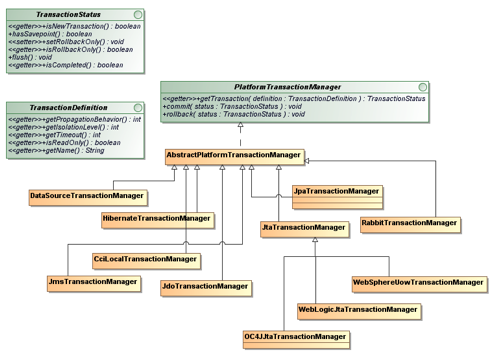
The Spring framework also provides the TransactionTemplate, which works with a PlatformTransactionManager implementation and can be used to automatically enclose a unit of work in a transaction so that you don't even need to know about the PlatformTransactionManager API itself, and so that the usage contract of the PlatformTransactionManager is satisfied: the transaction will be correctly started, executed, prepared and committed, and - if an exception is thrown during processing, the transaction will be rolled back.
@Inject private PlatformTransactionManager txManager;

TransactionTemplate template  = new TransactionTemplate(this.txManager);
template.execute( new TransactionCallback<Object>(){
  public void doInTransaction(TransactionStatus status){
   // work done here will be wrapped by a transaction and committed.
   // the transaction will be rolled back if
   // status.setRollbackOnly(true) is called or an exception is thrown
  }
});
Taking things a step further, the Spring framework provides solid AOP-based support for enclosing method invocations in a transaction by simply enabling support for it. With this support, you no longer need the TransactionTemplate - the transaction management happens automatically for any method annotated with declarative transaction management enabled. If you’re using Spring’s XML configuration, then use this:
<tx:annotation-driven transaction-manager = “platformTransactionManagerReference” />
If you’re using Spring 3.1, then you can simply annotate your Java configuration class, like this:
@EnableTransactionManagement
@Configuration
public class MyConfiguration {
  ...
This annotation will automatically scan your beans and look for a bean of type PlatformTransactionManager, which it will use. Then, in your Java beans, simply declare methods as transactional by annotating them.
@Transactional
public void work() {
  // the transaction will be rolled back if the
  // method throws an Exception, otherwise committed
}
Spring provides support for JTA-based global transaction implementations through a PlatformTransactionManager implementation called JtaTransactionManager. If you use it on a JavaEE application server, it will automatically find the correct javax.transaction.UserTransaction reference from JNDI. Additionally, it will attempt to find the container-specific javax.transaction.TransactionManager reference in 9 different application servers for more advanced use cases like transaction suspension. Behind the scenes, Spring loads different JtaTransactionManager subclasses to take advantage of specific, extra features in different servers when available, for example: WebLogicJtaTransactionManager, WebSphereUowTransactionManager and OC4JJtaTransactionManager.
So, if you're inside a Java EE application server, and can't escape, but want to use Spring's JTA support, then chances are good that you can use the following namespace configuration support to factory a JtaTransactionManager correctly (and automatically):
<tx:jta-transaction-manager />
Alternatively, you can register a JtaTransactionManager bean instance as appropriate, with no constructor arguments, like this:
@Bean
 public PlatformTransactionManager platformTransactionManager(){
    return new JtaTransactionManager();
}
Either way, the end result in a JavaEE application server is that you can now use JTA to manage your transactions in a unified manner thanks to Spring.
Many choose to use JTA outside of a Java EE application server for obvious reasons: Tomcat or Jetty are lighter, faster, cheaper, testing is possible (and easier), business logic often doesn’t live in an application server, etc. These reasons are more important today in the cloud than ever, where lightweight, composable resources are the norm and top-heavy, monolithic application servers simply don’t scale.
There are many open-source and commercial, independent JTA transaction managers. In the open-source community, you have several choices like the Java Open Transaction Manager (JOTM), JBoss TS, Bitronix Transaction Manager (BTM), and Atomikos.
In this post we'll introduce a simple method that employs global transactions. We’ll focus on the Atomikos-specific configuration, but there’s also an example demonstrating the identical configuration using Bitronix in the source code.
The transaction method, in this case, is a simple JPA-based service that must simultaneously submit a JMS message. The code is the hypothetical checkout method for a typical online retailer's shopping cart. The code looks like this:
	@Transactional
	public void checkout(long purchaseId) {
		Purchase purchase = getPurchaseById(purchaseId);

		if (purchase.isFrozen())
		  throw new RuntimeException(
			 "you can't check out Purchase(#" + purchase.getId() + ") that's already been checked out!");

		Date purchasedDate = new Date();
		Set<LineItem> lis = purchase.getLineItems();
		for (LineItem lineItem : lis) {
			lineItem.setPurchasedDate(purchasedDate);
			entityManager.merge(lineItem);
		}
		purchase.setFrozen(true);

		this.entityManager.merge(purchase);
		log.debug("saved purchase updates");

		this.jmsTemplate.convertAndSend(this.ordersDestinationName, purchase);
		log.debug("sent partner notification");
	}
The method uses the @Transactional annotation to tell Spring to wrap its invocation in a transaction. The method is employing both JPA - to merge an entity's changed state - and JMS. So, the work spans two transactional resources and must be made to be consistent among both of them: either both the database update operation and the JMS send operation succeed, or they both rollback. You wouldn't want to trigger a fulfillment cycle with the JMS message for a product that hasn't been paid for, after all!
In order to test the JTA configuration works, you can simply throw a RuntimeException at the very last line, like this:
if (true) throw new RuntimeException("Monkey wrench!");
By then, the purchase entity in the database under normal operation should have had its state changed to frozen and the JMS message should have been sent, triggering fulfillment. An exception thrown at the last line will rollback both of those changes. Spring's declarative transaction management will intercept the exception and automatically roll back the transaction using the configured JtaTransactionManager. You can then verify that those two events never occurred, and that they are not reflected in the corresponding resources: no JMS message will be enqueued, and the JPA entity’s database record will not have been changed. The test case I used for this was:
package org.springsource.jta.etailer.store.services;

import org.apache.commons.logging.*;
import org.junit.*;
import org.junit.runner.RunWith;
import org.springframework.test.context.ContextConfiguration;
import org.springframework.test.context.junit4.SpringJUnit4ClassRunner;
import org.springframework.test.context.support.AnnotationConfigContextLoader;
import org.springsource.jta.etailer.store.config.*;
import org.springsource.jta.etailer.store.domain.*;
import javax.inject.Inject;
import static org.junit.Assert.assertEquals;
import static org.junit.Assert.assertTrue;

@RunWith(SpringJUnit4ClassRunner.class)
@ContextConfiguration(loader = AnnotationConfigContextLoader.class,
       classes = {AtomikosJtaConfiguration.class, StoreConfiguration.class})
public class JpaDatabaseCustomerOrderServiceTest {

	private Log log = LogFactory.getLog(getClass().getName());

	@Inject private CustomerOrderService customerOrderService;
	@Inject private CustomerService customerService;
	@Inject private ProductService productService;

	@Test
	public void testAddingProductsToCart() throws Exception {
		Customer customer = customerService.createCustomer("A", "Customer");
		Purchase purchase = customerOrderService.createPurchase(customer.getId());
		Product product1 = productService.createProduct(
                 "Widget1", "a widget that slices (but not dices)", 12.0);
		Product product2 = productService.createProduct(
                 "Widget2", "a widget that dices (but not slices)", 7.5);
		LineItem one = customerOrderService.addProductToPurchase(
                 purchase.getId(), product1.getId());
		LineItem two = customerOrderService.addProductToPurchase(
                 purchase.getId(), product2.getId());
		purchase = customerOrderService.getPurchaseById(purchase.getId());
		assertTrue(purchase.getTotal() == (product1.getPrice() + product2.getPrice()));
		assertEquals(one.getPurchase().getId(), purchase.getId());
		assertEquals(two.getPurchase().getId(), purchase.getId());
		// this is the part that requires XA to work correctly
		customerOrderService.checkout(purchase.getId());
	}
}
The test is a simple transactional script: the shopper creates an account, finds things she likes, adds them to the cart as line items, and then checks out. The checkout method saves the changed state for the shopping cart to the database and then sends a trigger JMS message to notify other systems of the new order. It is in this checkout method that JTA is essential.
We have two configuration classes - the JTA provider specific code which is setup to properly construct an instance of Spring’s JtaTransactionManager - and the rest of the configuration, which should remain static regardless of the PlatformTransactionManager strategy chosen.
I've used Spring's modular Java configuration to split out the JTA-provider-specific configuration class from the rest of the configuration, so you can easily switch between the Atomikos-specific JTA configuration and the Bitronix-specific JTA configuration.
Let's look at the StoreConfiguration class - it will be the same no matter which transaction manager implementation you use. I've only excerpted the salient parts so that you can see which parts interact with the configuration that is JTA-provider specific.
package org.springsource.jta.etailer.store.config;

import org.hibernate.cfg.ImprovedNamingStrategy;
import org.hibernate.dialect.MySQL5Dialect;
import org.springframework.context.annotation.Bean;
import org.springframework.context.annotation.ComponentScan;
import org.springframework.context.annotation.Configuration;
import org.springframework.dao.annotation.PersistenceExceptionTranslationPostProcessor;
import org.springframework.jms.core.JmsTemplate;
import org.springframework.orm.jpa.LocalContainerEntityManagerFactoryBean;
import org.springframework.orm.jpa.vendor.Database;
import org.springframework.orm.jpa.vendor.HibernateJpaVendorAdapter;
import org.springframework.stereotype.Service;
import org.springframework.transaction.PlatformTransactionManager;
import org.springframework.transaction.annotation.EnableTransactionManagement;
import org.springframework.transaction.jta.JtaTransactionManager;
import javax.inject.Inject;
import javax.transaction.TransactionManager;
import javax.transaction.UserTransaction;
import java.util.Properties;

@EnableTransactionManagement
@Configuration
@ComponentScan(value = "org.springsource.jta.etailer.store.services")
public class StoreConfiguration {

	// ...

	// this is a reference to a specific Java configuration class for JTA
	@Inject private AtomikosJtaConfiguration jtaConfiguration ;

	@Bean
	public JmsTemplate jmsTemplate() throws Throwable{
		JmsTemplate jmsTemplate = new JmsTemplate(  jtaConfiguration.connectionFactory() );
		// ...
	}

	@Bean
	public LocalContainerEntityManagerFactoryBean entityManager () throws Throwable  {
		LocalContainerEntityManagerFactoryBean entityManager =
		   new LocalContainerEntityManagerFactoryBean();
		entityManager.setDataSource(jtaConfiguration.dataSource());
		Properties properties = new Properties();
		// ...
		jtaConfiguration.tailorProperties(properties);
		entityManager.setJpaProperties(properties);
		return entityManager;
	}

	@Bean
	public PlatformTransactionManager platformTransactionManager()  throws Throwable {
		return new JtaTransactionManager(
                         jtaConfiguration.userTransaction(), jtaConfiguration.transactionManager());
	}
}
The configuration is all pretty boilerplate – just the normal objects you might configure for any JPA or JMS application. The configuration class, to do its work, needs access to a javax.jms.ConnectionFactory, a javax.sql.DataSource, a javax.transaction.UserTransaction and a javax.transaction.TransactionManager. Because the construction of objects that meet these interfaces is specific to each transaction manager implementation, the definitions of these beans live in a separate Java configuration class, which we import using field injection (@Inject private AtomikosJtaConfiguration jtaConfiguration) at the top of the StoreConfiguration class.
Our StoreConfiguration turns on automatic transaction handling with the @EnableTransactionManagement annotation.
We use Spring 3.1’s @PropertySource annotation - which ties into the environment abstraction - to access the keys and values in the services.properties. The property file looks like this:
dataSource.url=jdbc:mysql://127.0.0.1/crm
dataSource.driverClassName=com.mysql.jdbc.Driver
dataSource.dialect=org.hibernate.dialect.MySQL5InnoDBDialect
dataSource.user=crm
dataSource.password=crm

jms.partnernotifications.destination=orders
jms.broker.url=tcp://localhost:61616
The most important thing that any JTA configuration will ultimately do is provide a reference to the provider-specific UserTransaction, and a reference to the provider-specific TransactionManager, which is used in creating the PlatformTransactionManager instance, like this:
	@Bean
	public PlatformTransactionManager platformTransactionManager() throws Throwable {
	  UserTransaction userTransaction = jtaConfiguration.userTransaction() ;
	  TransactionManager transactionManager = jtaConfiguration.transactionManager() ;
	  return new JtaTransactionManager(  userTransaction, transactionManager );
	}
We won’t look at the specifics of both Bitronix and Atomikos implementations, just one, since the source code for the Atomikos configuration is available here, and the source code for the Bitronix configuration is available here. Let’s dissect the Atomikos implementation so that we can breakdown the important players. Once you know what the players are, then understanding the configuration for any third party JTA provider is simple. Swapping out which configuration is used when you run the code is straightforward.
package org.springsource.jta.etailer.store.config;

import com.atomikos.icatch.jta.UserTransactionImp;
import com.atomikos.icatch.jta.UserTransactionManager;
import com.atomikos.icatch.jta.hibernate3.TransactionManagerLookup;
import com.atomikos.jdbc.AtomikosDataSourceBean;
import com.atomikos.jms.AtomikosConnectionFactoryBean;
import com.mysql.jdbc.jdbc2.optional.MysqlXADataSource;
import org.apache.activemq.ActiveMQXAConnectionFactory;
import org.springframework.beans.factory.annotation.Value;
import org.springframework.context.annotation.Bean;
import org.springframework.context.annotation.Configuration;
import org.springframework.context.annotation.PropertySource;
import org.springframework.core.env.Environment;

import javax.inject.Inject;
import javax.jms.ConnectionFactory;
import javax.sql.DataSource;
import javax.transaction.TransactionManager;
import javax.transaction.UserTransaction;
import java.util.Properties;

@Configuration
public class AtomikosJtaConfiguration {

	@Inject private Environment environment ;

	public void tailorProperties(Properties properties) {
		properties.setProperty( "hibernate.transaction.manager_lookup_class",
				 TransactionManagerLookup.class.getName());
	}

	@Bean
	public UserTransaction userTransaction() throws Throwable {
		UserTransactionImp userTransactionImp = new UserTransactionImp();
		userTransactionImp.setTransactionTimeout(1000);
		return userTransactionImp;
	}

	@Bean(initMethod = "init", destroyMethod = "close")
	public TransactionManager transactionManager() throws Throwable {
		UserTransactionManager userTransactionManager = new UserTransactionManager();
		userTransactionManager.setForceShutdown(false);
		return userTransactionManager;
	}

	@Bean(initMethod = "init", destroyMethod = "close")
	public DataSource dataSource() {
		MysqlXADataSource mysqlXaDataSource = new MysqlXADataSource();
		mysqlXaDataSource.setUrl(this.environment.getProperty("dataSource.url"));
		mysqlXaDataSource.setPinGlobalTxToPhysicalConnection(true);
		mysqlXaDataSource.setPassword(this.environment.getProperty("dataSource.password"));
		mysqlXaDataSource.setUser(this.environment.getProperty ("dataSource.password"));

		AtomikosDataSourceBean xaDataSource = new AtomikosDataSourceBean();
		xaDataSource.setXaDataSource(mysqlXaDataSource);
		xaDataSource.setUniqueResourceName("xads");
		return xaDataSource;
	}

	@Bean(initMethod = "init", destroyMethod = "close")
	public ConnectionFactory connectionFactory() {
		ActiveMQXAConnectionFactory activeMQXAConnectionFactory = new ActiveMQXAConnectionFactory();
		activeMQXAConnectionFactory.setBrokerURL(this.environment.getProperty( "jms.broker.url")  );
		AtomikosConnectionFactoryBean atomikosConnectionFactoryBean = new AtomikosConnectionFactoryBean();
		atomikosConnectionFactoryBean.setUniqueResourceName("xamq");
		atomikosConnectionFactoryBean.setLocalTransactionMode(false);
		atomikosConnectionFactoryBean.setXaConnectionFactory(activeMQXAConnectionFactory);
		return atomikosConnectionFactoryBean;
	}
}
Atomikos provides its own java.sql.DataSource and javax.jms.ConnectionFactory wrappers that adapt any native java.sql.DataSource or javax.jms.ConnectionFactory to one that is JTA (and XA) aware.
To teach Hibernate how to participate in the Atomikos transaction, we must set a property - hibernate.transaction.manager_lookup_class - in this case, a class called TransactionManagerLookup. You will need to do this for any JTA implementation.
Finally, we need to provide a javax.transaction.TransactionManager implementation, and a javax.transaction.UserTransaction implementation. The two beans at the top of the class are Atomikos’ implementations of those two interfaces, which are used in constructing Spring’s JtaTransactionManager implementation, which is an implementation of PlatformTransactionManager.
The PlatformTransactionManager instance is in turn automatically picked up by the @EnableTransactionManagement annotation on our configuration class and used to perform transactions whenever any method with @Transactional is invoked.
The duties of a javax.transaction.UserTransaction implementation and a javax.transaction.TransactionManager implementation are similar: the UserTransaction is the user-facing API, and the TransactionManager is the server-facing API. All JTA implementations specify a UserTransaction0 implementation, as it is the minimum required by JavaEE. The TransactionManager is not a requirement, and is not always available in every server or JTA implementation.
For those familiar with JTA, using the UserTransaction, as you do when controlling transactions programmatically in JavaEE, has some significant gaps, perhaps understandable given the now obsolete assumption when J2EE was first conceived nearly ten years ago that no one would ever want to do transaction management without EJB.
The problem is that some operations like suspending a transaction (to get "requires new" semantics, for example), are only possible on the TransactionManager. This interface is standardized in the JTA spec, but unlike the UserTransaction it does not offer a well-known JNDI location or other way of obtaining it. Some other things, such as control of isolation level or server-specific "transaction naming" (for monitoring or other purposes) are not possible at all with JTA.
TransactionManager provides advanced features like transaction suspension and resumption, so most providers support it as well. In fact, manyjavax.transaction.TransactionManager implementations can be cast at runtime to a javax.transaction.UserTransaction implementation. Spring knows this and is very smart about it. If you define an instance of Spring’s JtaTransactionManager implementation with only a reference to a javax.transaction.TransactionManager, it will attempt to coerce a javax.transaction.UserTransaction instance out of it at runtime, as well. Atomikos, however, does not do this, and so we explicitly define a javax.transaction.UserTransaction instance and - to take better advantage of the more enhanced capabilities of a javax.transaction.TransactionManager - a separate javax.transaction.TransactionManager instance.
And, that’s it! You can have your cake, and eat it too with Spring. The Bitronix configuration looks similar as it is satisfying similar duties. You won’t have to tweak this code very often. It’s quite likely you can simply reuse the configuration presented here, adjusting the connection strings and drivers as appropriate.

VMware offers training and certification to turbo-charge your progress.
Learn moreTanzu Spring Runtime offers support and binaries for OpenJDK™, Spring, and Apache Tomcat® in one simple subscription.
Learn moreCheck out all the upcoming events in the Spring community.
View all