Get ahead
VMware offers training and certification to turbo-charge your progress.
Learn moreWeb applications typically rely heavily on what we call static resources, such as Javascript, CSS and image files. In a Grails application, they are put into a project's web-app directory and then referenced from the HTML. For example,
<link rel="stylesheet" href="${resource(dir: 'css', file: 'main.css')}" type="text/css">
will create a link to the file web-app/css/main.css. All very straightforward. You might even think that the current support is more than sufficient for anyone's needs. What else would you want to do?
That's a good point. The answer depends on the complexity of your application, but let's start with the example CSS link above. Why do we have to type out the <link rel="..." href=...>? Just by looking at the extension, we know that the resource is a CSS file. We also know that CSS files should be linked into an HTML page using the above element. So we're basically doing a lot of typing for something that Grails should be able to handle itself.
"OK," I hear you say, "but we could add a tag for CSS links." Indeed we could, and Grails 2 will include a <g:external/> tag that intelligently picks the appropriate link type for the resource. But now consider production: wouldn't it be a good idea to bundle CSS and Javascript files together? What about compressing them? (As an aside, Yahoo provides a tool called ySlow that will give you hints on just these kinds of optimisation). So how do we implement such optimisations? You could probably do it on an ad-hoc basis, but doing so limits your options because you can't define relationships between resources. What we really want is some way of declaring resources in a central place and indicating which ones should be processed and bundled together.
If I have yet to persuade you that there could be a better way to manage static resources, then think about Grails plugins. Many of these provide their own static resources. In fact, some plugins provide the same resources as each other. For example older versions of the YUI, Bubbling and Grails UI plugins all include the YUI libraries. Do we really need multiple copies of entire Javascript libraries? Of course not. Part of the problem can be solved with inter-plugin dependencies, but that doesn't work well on its own because there is no way for a plugin to say that some of its resources depend on specific resources in another plugin. In the end, it's up to the developer to make sure that all the appropriate resources (including transitive dependencies) are included in each page. That may involve some trial and error to make sure all requires resources are linked into the page and in the correct order.
Fortunately, we can do better. Enter the Resources plugin.
By installing just this one plugin, you can start declaring your static resources (Javascript, CSS, etc.) in reusable modules. You can then define dependencies between modules so that Grails knows exactly which resources a module requires, including those specified in transitive dependencies. As an added benefit, modules ensure that resources are always declared in the correct order in a page and that there are no duplicates. In doing so, modules take much of the pain out of static resource management.
You can declare resource modules in both applications and plugins. There are a couple of ways of doing this, but the most common approach is to add one or more dedicated artifacts to the project. For an application this might be grails-app/conf/ApplicationResources.groovy. As another example, the YUI plugin has grails-app/conf/YuiPluginResources.groovy. The basic structure of these files looks like this:
modules = {
    core {
        resource url: 'js/core.js', disposition: 'head'
        resource url: 'js/ui.js'
        resource url: 'css/main.css'
        resource url: 'css/branding.css'
        resource url: 'css/print.css', attrs: [media: 'print']
    }

    utils {
        dependsOn 'jquery'
        resource url: 'js/utils.js'
    }

    forms {
        dependsOn 'core', 'utils'

        resource url: 'css/forms.css'
        resource url: 'js/forms.js'
    }
}
"core", "utils" and "forms" are the names of our application modules, and as you can probably guess, the "forms" module depends on both "core" and "utils". You can also see that the "utils" module depends on "jquery", which is a module provided by the jQuery plugin. This structure is best seen in diagrammatic form:
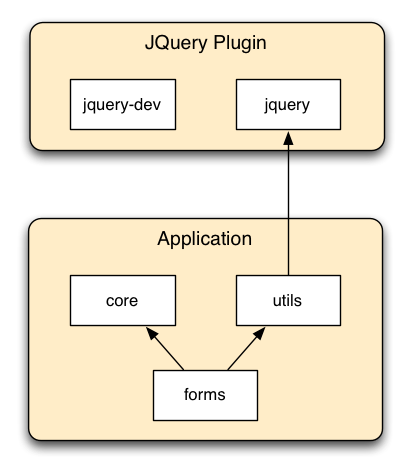
If we look a bit deeper into the above module definitions, we can see that individual resources are declared within a module using "resource" plus a URL. This URL is the location of the resource relative to the web-app directory in your project. If you wish, you can also add extra attributes for fine-grained control of resources, in particular via the "disposition" setting.
There are two standard dispositions: "head", meaning that a resource goes inside the <head> element, and "defer", which typically means the end of the body (although you have control over the exact placement as you'll see shortly). By default, CSS files have a disposition of "head" while Javascript files use "defer", but these defaults can be overridden on a per-resource basis.
We now have the basis for defining simple or complex networks of resource modules, with those networks crossing application and plugin boundaries. Even better from a user's perspective, it's up to the plugins to make sure that their modules include the appropriate resources and dependencies.
So, Grails may now be aware of what static resources your application and its plugins provide, but it still doesn't know which pages require which resources. For that, you have to make some modifications to your GSPs.
As you know, you previously had to declare all your CSS and Javascript links explicitly in your layouts and views. So how does this change with the Resources plugin? Instead of putting in links to individual resources, you declare which modules your page requires, which makes for much conciser <head> blocks. In addition, you specify where in the page the resource links should go. Here's an example of a very simple layout using Resources:
<html>
<head>
    ...
    <r:require modules="common, jquery"/>
    <r:layoutResources/>
</head>
<body>
    ...
    <r:layoutResources/>
</body>
</html>
As you can probably work out, the <r:require> tag tells Grails which static resources to include in the page while the <r:layoutResources> tags specify where the links should go. You should have two <r:layoutResources> tags: one in <head> and the other in <body>. Any resource with a disposition of "head" will go where the first one is, while those with a disposition of "defer" will be inserted at the second's location.
That really is it! Most of the work goes into ensuring that your module definitions are correct.
What I have covered so far works really well for CSS, Javascript and favicon files because the Resources plugin knows what links to generate for them and where to put those links. But what happens with inline images and scripts?
The Resources plugin calls inline images and scripts "ad-hoc resources". These typically aren't declared in modules and are simply processed as and when they are encountered in the page. A standard inline image link looks something like:
<img src="${resource(dir:'images',file:'grails_logo.png')}" ... />
So how do we make the Resources plugin aware of the image file? We don't! As of Grails 2.0, the <g:resource/> tag (used as a method above) automatically registers the resource with the plugin if it's installed. That means all the magic performed by mappers (which I'll talk about in a bit) will be applied to the given resource. And of course, <g:resource/> can be used for any type of resource, not just images.
Inline scripts are a little different because they aren't links to external files. Yet they can still benefit from the Resources plugin. By default all inline scripts declared with the <g:javascript/> tag will behave as they always have done. But if you replace <g:javascript/> with the <r:script/> tag, the inline script will be moved to the location of the second <r:layoutResources/> (their default disposition is "defer"). You can also declare an explicit disposition so that the script goes into <head>. Best of all, the inline scripts retain the order in which they are declared in the page.
There is one other source of ad-hoc resources to mention: CSS. Stylesheets are a common way of specifying background and other types of image, but CSS files aren't processed as GSP files. Is the Resources plugin aware of these links? Fortunately, yes. Even though the Resources plugin modifies the URL paths for all the resources it manages, that doesn't matter to you because the plugin also updates the links in the CSS files automatically. Everything will just work!
On its own, the Resources plugin makes the management of static resources much simpler than before. But that's only part of the story. Since the plugin knows about all the resources and controls the link generation for them, it can perform extra processing to add interesting behaviour. This processing is done by an extensible pipeline of mappers:
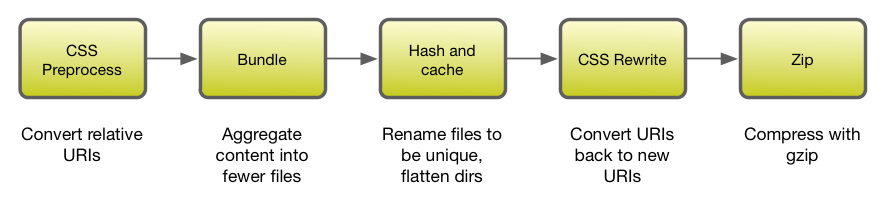
Don't take this diagram as an absolute and correct reference: as a user, the exact pipeline and how it works doesn't really matter. The key is that you can if you want add your own mapper implementations or simply install a plugin that provides some mappers of its own. The result is some very powerful features for near zero effort.
For example, let's say you have the Resources plugin installed, some modules defined, and your GSP views and layouts set up to use the appropriate tags. Simply by installing the Cached Resources and Zipped Resources plugins, you will immediately start satisfying some of the ySlow recommendations, such as having a long-dated Expires header and gzip compression for all your static resources (although you can disable gzip compression for specific file types such as images, which tend to be compressed already). It shouldn't be this easy, right? But it is.
The Resources plugin has been around for a little while and is already used in a few production sites. It's even in use on the Grails website. And no wonder: it combines much improved management of static resources with a mapper pipeline that allows for easy-to-use but powerful features. Experienced web developers will notice the difference immediately, and you can expect more and more plugins to come with Resources support in the future. It even has its own user guide.
Because of the advantages the plugin brings, Grails 2 makes it a default plugin for new Grails projects and also integrates it into some of the core tags, such as <g:resource>. But even if you can't use Grails 2 yet, you can still make use of it with older versions of Grails and benefit from great resource management with little effort. One of it's key design principles is that it can be installed in any Grails application without breaking anything.
Whichever version of Grails you use, installing this plugin will improve your life as a web developer. That's not something to be sniffed at.

VMware offers training and certification to turbo-charge your progress.
Learn moreTanzu Spring Runtime offers support and binaries for OpenJDK™, Spring, and Apache Tomcat® in one simple subscription.
Learn moreCheck out all the upcoming events in the Spring community.
View all