Blogs

SpringSource Blog

New Groovy Debug Support in STS 2.5.1

Andrew Eisenberg

We have included some big improvements to Groovy Debugging in the recent release of the SpringSource Tool Suite 2.5.1. It has always been possible to debug your Groovy applications using Eclipse's vanilla debug support for Java, but due to Groovy's language differences from Java and its metaprogramming, many debug features have not been working as well as they could.

All of the screenshots in this post were taken from a simple Grails app and so the debug features here are implicitly making use of dynamically added Groovy methods and properties.

Step Into

With the enhanced Groovy debug support, the step into command works exactly as you would expect. In the past, due to Groovy's extensive use of reflection and cached call sites, uninteresting stack frames would sometimes be stepped into and interesting ones might be stepped over, making debugging a sometimes unpleasant experience.

Now, it is possible to step into Groovy methods and closures, ignoring all uninteresting Groovy runtime and framework calls:
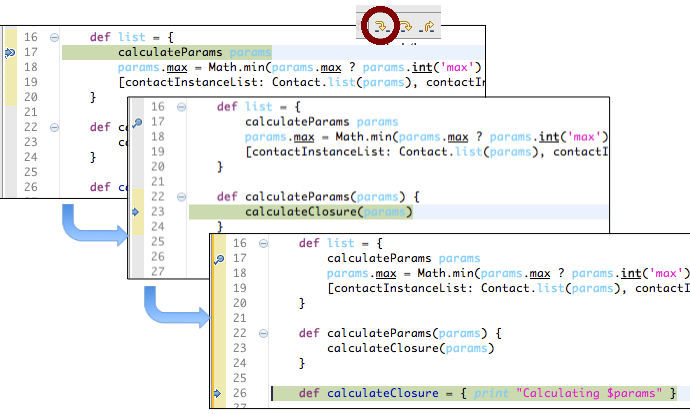
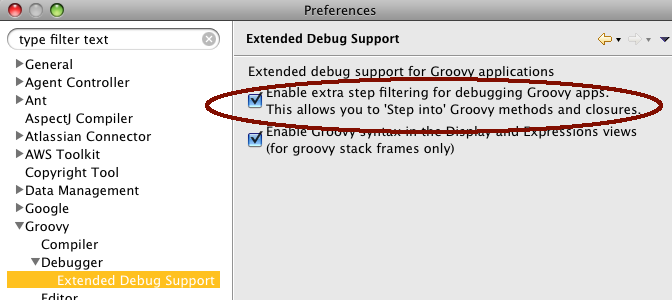
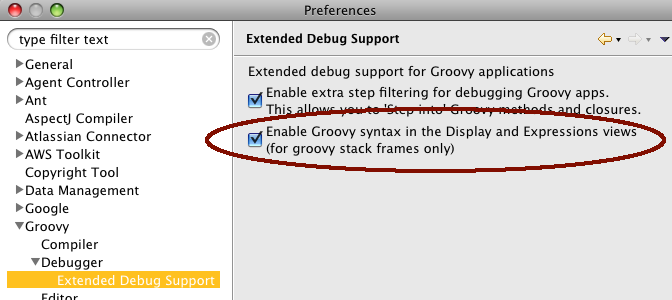
This support can be disabled from the Groovy -> Debugger -> Extended Debug Support preference page:
Evaluation of Groovy code while debugging

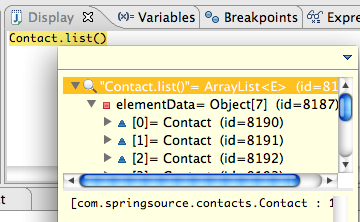
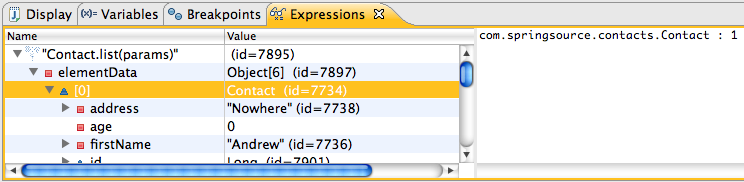
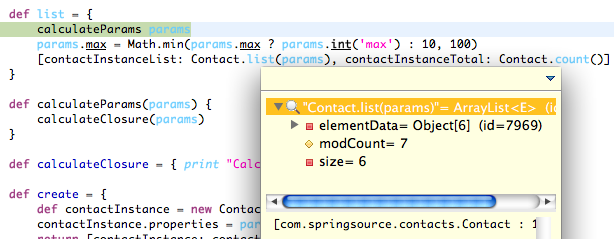
When the debugger is stopped on a Groovy stack frame, the display view and expressions view now recognize Groovy syntax with full access to Groovy's dynamically added methods and properties.

In the display view:
In the expressions view:
And, even in the editor (by selecting a code snipped and using the CTRL-Shift-I keyboard shortcut):
If you need to disable this support, you can also do so from the Groovy -> Debugger -> Extended Debug Support preference page:
Nearly everything

Anything that you can do in your debugged application should be possible from the display view, well nearly everything except for defining new classes, methods, properties, and closures. Groovy is a large language and constantly evolving. There may be other language features that are not yet supported, but the basics, including variable definitions, loops, conditionals, and gstring list and map literals are all available in an evaluation.

For example, it is possible to add new instances of a Grails domain class:

And loop through a collection:

Perhaps the strangest use of the Groovy MOP (a brief note on implementation)

The Groovy Metaobject Protocol or MOP provides a structured way to change the semantics of Groovy, by giving end-users control over method invocations and property accesses. The core of the new Groovy debug support relies on the Groovy MOP for code evaluation. Here's how it works:

  • Before each evaluation, the selected Groovy code is compiled into a script in the running instance of STS (not the debugged application).
  • The metaclasses of this script and all classes referenced in the script are changed to a Java Debug Interface (JDI) metaclass. JDI defines a protocol for using a debugger to communicate with a debugged application through a socket.
  • Through the JDI, these meta-classes usurp all method calls, property accesses, and constructor invocations so that the effects occur on the debugged JVM, rather than locally. You can think of the compiled script as a mock that delegates all actions to the debugged application.

This gives us nearly complete control over the debugged application from the running instance of STS. We were surprised and impressed that the Groovy MOP is powerful enough to be used to execute a Groovy script on a remote application.

If you have a comment, feature request, or something is not working for you, then please raise a jira issue for it or mention it on the SpringSource Tool Suite forum.

Similar Posts

Share this Post
  • Digg
  • Sphinn
  • del.icio.us
  • Facebook
  • Mixx
  • Google Bookmarks
  • DZone
  • LinkedIn
  • Slashdot
  • Technorati
  • Twitter
 

18 responses


  1. hello sir ,

    i'm feeling very happy after knowing more information about groovy . i'm learning groovy as beginner.
    i want to know that how to add groovy plugin to myeclipse , so that it can help me to debug groovy .
    i'm working on ofbiz framework.
    please , help me if u can.
    thanks
    Regards

    Vivek


  2. Andrew, thanks for info about new debugging possibilities in STS.

    Which versions of Grails can be debugged such way ?
    1.1.x ?


  3. Hey Andrew,

    The step into improvements seem rather a good pattern for an improvement to STS… to be able to skip uninteresting stack frames, such as proxies for transaction management etc.

    How easy would it be to translate what you've done into a Spring aware debugger for Java?


  4. Thinking a bit more on that, could your improvements with Groovy be generalised into a feature where we could enter method patterns (perhaps pointcut style) to specify what stack frames to skip?


  5. @vivek: You can install Groovy-Eclipse from the following update site. Just add this URL into your update manager:
    http://dist.codehaus.org/groovy/distributions/greclipse/snapshot/e3.6/

    The debug support is only available in STS, however. The reason for this is that we needed to use AspectJ to weave into the underlying JDT debug framework. This capability is not available in Groovy-Eclipse.

    @Igor: This functionality is independent of a grails version. But you must be using STS 2.5.1 or later. I'd recommend updating to a nightly build of the Grails tooling to take advantage of some fixed bugs. You can get the nightly build from the following update site:
    http://dist.springsource.com/snapshot/TOOLS/nightly/e3.6

    @Neale: For general Spring apps, you might be better off using regular step filters defined in JDT. See Preferences -> Java -> Debug -> Step Filtering. As mentioned in the post, this will not work for Groovy since the patterns available here are too coarse grained to properly filter Groovy frames, but I'd imagine that it should be sufficient for vanilla Spring apps.

    Or is there something here that I am missing? If you can be a bit more specific, then there may be something we can do extra for Spring.


  6. @Andrew: I was originally thinking a toggle button for Spring specific stack frames, and then thought about generalisation.

    I think there's probably a better approach to this for Eclipse in general, which would be to have a drop-down of configurable Step Filtering working sets, rather than being able to just switch on and off what's in the prefs.

    Such an improvement would probably parallel the e4 work around JDT extensions for other languages, such that your Groovy patterns work.


  7. …must have… debugging in Eclipse-Grails – especially when needing to debug a test.

    Eclipse-Grails has the debugging today, but you can't just run one particular test and set a debug point on it that I know of.

    That said, good to see progress in this area


  8. @Neale,

    So, are you saying that generally you'd like to see step filters more easily configurable, perhaps on a project by project basis, or by project nature, working sets, or even by debug session?

    On our work in STS, there's a bit that we can do here (specifically for spring apps or groovy apps), but a more general approach would have to be coming from Eclipse (likely e4 as you suggest).


  9. @Steve,

    Can you please be more specific? It is possible to debug Grails applications and run Grails tests (and yes. set breakpoints). What exactly is not working for you?

    You can run unit tests by right-clicking on an individual test case. Integration tests can only be run per-project or per-package, and not as an individual test (due to the way integration tests must be launched).

    And, when you say Eclipse-Grails, do you mean STS?


  10. Andrew,
    I updated to the latest version of the groovy plugin and i can't get this to work. Debugging is still working like used to (that meaning no groovy script support). I checked that the options are properly enabled in the groovy configuration. Am i missing some other configuration?. By the way, i'm on ubuntu, i don't know if that means anything to you.

    Thanks


  11. @Emiliano

    Did you also update the Grails tooling plugin?


  12. Andrew, thanks for the reply. I checked my installation for updates with no luck. I also added the nightly repo to my update sites, maybe there was an update i was missing, but it didn't find any updates.
    These are my grails and groovy plugin versions, maybe you can get something from these numbers:

    SpringSource Tool Suite Grails Support 2.5.1.201011111000-RELEASE
    Groovy-Eclipse Feature 2.1.1.xx-20101124-2100-e36
    Using grails 1.3.5

    Thanks


  13. You are using the release version of Grails Tooling and the nightly snapshot of Groovy-Eclipse. This should work, but there have been several bug fixes since then. Rather than checking for updates, you can go straight to the update manager and look for new features to install, and select the Grails tooling from the nightly site (it will automatically update since it is already installed).

    But, this still does not explain why you are not getting the debug support. You can try the following:

    1. Check to make sure that JDT Weaving is enabled (look at Preferences -> JDT Weaving). If it is not, then click to enable and restart.
    2. Check the error log for any relevant errors and let me know if you find anything.


  14. Andrew, I updated to the latest version of the groovy plugin and i can't get this to work. Debugging is still working like used to (that meaning no groovy script support). I checked that the options are properly enabled in the groovy configuration. Am i missing some other configuration?. By the way, i'm on ubuntu, i don't know if that means anything to you. Thanks


  15. I'm assuming that you are using STS. Is that correct? Also, check to see that JDT Weaving is enabled. Go to Preferences -> JDT Weaving. Lastly, make sure that your STS install directory is writable.


  16. Not sure if this is related to above posters re: lack of groovy support, but in my case, on STS 2.6.0.2 in a Groovy project I am unable to "Run as Groovy Script", does not even appear in Run as options.

    Everything else works fine for Groovy (great autocomplete, etc.), but my fingers are hurting typing everything out in groovyConsole (backspace in spaces instead of tabs [argggh], no autocomplete, etc.)

    Please help my aching fingers! Sorry to mention, but IJ has this feature out of the box, no config needed.

    Thanks, this feature was there in pre-STS 2.5 as I recall, something must have changed…


  17. @virtualeyes,

    This feature is still available. As I mentioned on the bug report that you raised here:
    http://jira.codehaus.org/browse/GRECLIPSE-1020

    It could be something about your groovy file that makes it seem like it is not a groovy script. Please comment on the bug report for a further discussion.


  18. @Andrew, yes, on my end, my groovy files do not contain a main method; adding that brings back groovy run as options…

3 trackbacks

Leave a Reply