Get ahead
VMware offers training and certification to turbo-charge your progress.
Learn moreA fairly common question that I get from time to time is how to go about using JDK specific classes inside an OSGi environment. To some degree, this is equivalent to getting access to the bootstrapping classpath from OSGi, without bundling it. To express package dependencies, bundles use the OSGi directive inside their manifests - mainly Export-Package and Import-Package for providing and demanding, a respectively, a class package dependency. Defining a bundle wiring is a crucial step for creating a modular application; however there are cases, as the issue above, where the needed package is not available from a bundle.
Notable examples of such packages would be the <tt>sun.*</tt> and <tt>com.sun.*</tt>, present in the JDK jars. Even though these are <a href="http://java.sun.com/products/jdk/faq/faq-sun-packages.html">internal</a> packages and are not guaranteed to be portable, some of them can be found even in non-Sun JDKs, due to their usage. Your application might not use them, but there are various libraries that do (in some cases due to performance, in others because it's the only way to achieve a certain functionality). If the using bundle declares an import on the <tt>com.sun</tt> package, it will fail to resolve since there are no providers for it. If the import is not declared, since the bundle doesn't contain the class definition, the loading process will usually fail. Clearly the packages above are not a corner case; generalizing the example, the packages available in the OSGi framework boot classpath are not visible to the OSGi environment. There are several solutions to this problem but first, let's take a closer look to see why it occurs.
In OSGi, each module has its own class loader used for loading resources and classes. Based on the wiring directive, the platform creates a delegation network between the various modules. The network forms a class space which represents (quoting the OSGi spec) : "all classes reachable from a given bundle's class loader" or in layman terms, what a bundle can see, the bundle world view. The networks can intersect as the same package can be loaded by multiple bundles; however each space must be consistent, a requirement enforced by platform during the resolving phase of each bundle. One of the side effects (or aims) of the networking model is type isolation or class versioning: multiple version of the same class can coexist nicely inside the same VM since each one is loaded into its own network, its own space.
However, there are classes that need to be loaded differently such as java. packages. These classes are part of, and thus implicitly required by, the Java runtime itself. Each Java object for example, is a subclass of java.lang.Object which practically means that each bundle uses at least one Java package (java.lang). While such a dependency could be expressed through a directive in the bundle manifest, due to its mandatory nature, it becomes undesirable. That's why the java. packages are considered implied imports and can be loaded even though they are not declared, by each bundle. In fact, the OSGi spec forbids bundles to specify an import on java.* since class wiring always implies versioning which means running multiple Java versions inside the same VM which is not possible (at least not today).
For loading these fundamental types, the OSGi platform uses parent delegation instead of the networking model; that is, it uses the class loader that started the OSGi framework to load classes instead of an OSGi class space. As this may seem more complicated then it actually is, I've created a diagram using the dot language:
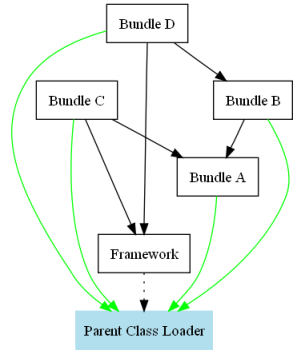 networking model
The careful reader might have noticed that only java.* packages have been mentioned - none of the other public packages available in the JDK such as the javax.net or javax.xml are parent delegated which means they have to be resolved within the class space. That is, bundles need to import the packages (which means there needs to be a provider) since they are not implied. The OSGi spec allows the Framework (through its system bundle) to export any relevant packages from its parent class loader as system packages using the org.osgi.framework.system.packages property. As repacking the hosting JDK as a bundle isn't a viable option, one can use this setting to have the system bundle (or the bundle with id 0) export these packages itself. Most of the OSGi implementations already use this property to export all the public JDK packages (based on the detected JDK version). Below is a snippet from an Equinox configuration file for Java 1.6:
org.osgi.framework.system.packages = \
  javax.accessibility,\
  javax.activity,\
  javax.crypto,\
  javax.crypto.interfaces,\
  ...
  org.xml.sax.helpers
Using this property, one can add extra packages that will be loaded and provided by the framework and that can be wired to other bundles.
org.osgi.framework.system.packages = \
  javax.accessibility,\
  javax.activity,\
  ...
  org.xml.sax.helpers, \
  special.parent.package
as can be seen by asking the system bundle (below a snippet from the OSGi console in Equinox):
osgi> bundle 0

System Bundle [0]
    Id=0, Status=ACTIVE
    Registered Services
    ...
    Exported packages
       ...
       org.xml.sax.helpers; version="0.0.0"[exported]
       special.parent.package; version="0.0.0"[exported]
       ...
The setting needs to be initialized before the OSGi framework starts so a common pattern is to set this as a system property. This approach will override the default configuration so the upcoming OSGi 4.2 defines another property, named org.osgi.framework.system.packages.extra which will append the defined system packages to the org.osgi.framework.system.packages configuration, making it easier to extend the configuration defined already by the OSGi implementation. Adding new packages can be as simple as passing an argument to the VM starting the platform:
java -Dorg.osgi.framework.system.packages.extra=special.parent.package;version=1.0 ...
Let's check the package again from the OSGi console:
osgi> packages special.parent.package

special.parent.package; version="1.0.0" <org.eclipse.osgi_3.5.0.v20081201-1815 [0]>
Another possible option is to enhance the system bundle through extension bundles. These act as fragments; they are not bundles of their own but rather are attached to a host. Once attached, the fragment content (including any permitted headers) is treated as part of the host. Extension bundles are a special kind of fragments that get attached only to the System bundle in order to deliver optional parts of the Framework (such as the Start Level service). One can use this mechanism to create an empty extension that just declares the needed packages, leaving the loading to its hosting bundle (in this case the Framework):
osgi> ss

Framework is launched.

id     State      Bundle
0    ACTIVE    org.eclipse.osgi_3.5.0.v20081201-1815
        Fragments=1
1    RESOLVED    a.framework.extension_0.0.0
        Master=0

osgi> bundle 1

a.framework.extension_0.0.0 [1]
    Id=1, Status=RESOLVED    Data Root=...
    No registered services.
    No services in use.
    Exported packages
       <b>special.parent.package; version="0.0.0"[exported]</b>
    No imported packages
    Host bundles
       <b>org.eclipse.osgi_3.5.0.v20081201-1815 [0]</b>
    No named class spaces
    No required bundles

osgi> headers 1

Bundle headers:
   Bundle-ManifestVersion = 2
   Bundle-SymbolicName = a.framework.extension
   <b>Export-Package = special.parent.package</b>
   <b>Fragment-Host = system.bundle; extension:=framework</b>
   Manifest-Version = 1.0
Notice the special host symbolic name and extra attribute in the Fragment-Host header above. This tells the Framework that the bundle is not just an ordinary fragment but an extension bundle. Once attached, the relevant extension manifest directives get merged with that of the system bundle, its host:
osgi> packages special.parent.package

special.parent.package; version="0.0.0"<org.eclipse.osgi_3.5.0.v20081201-1815 [0]>
Solution A' is basically a variant of A (hence the name) - instead of using system properties, one can use fragment bundles to extend the system bundle which can be more convenient in some cases. It's worth pointing out that the extension bundles might perform loading using the Java boot class path, an optional mechanism defined by the specification which is not required for compliant implementations. However, at the moment, none of the OSGi frameworks that I have tried, implement this feature.
The main advantage of both solutions is that the package is provided (and thus versioned) inside OSGi. The convention is to use the default version (0.0.0) for system packages, however, this is not mandatory (as can be seen above). A powerful side effect is the ability to provide a different, more up to date version of the package declared by the framework, through a different bundle. We used this to solve an issue with transaction data access caused by the fact that the JDK comes with an incomplete version of javax.transaction package which gets exported automatically, by the framework, inside the OSGi environment:
osgi> packages javax.transaction

javax.transaction; version="0.0.0"<org.eclipse.osgi_3.5.0.v20081201-1815 [0]>
The solution is to install a bundle that contains the full javax.transaction API with a higher version:
osgi> packages javax.transaction

javax.transaction; version="0.0.0"<org.eclipse.osgi_3.5.0.v20081201-1815 [0]>
javax.transaction; version="1.1.0"<com.springsource.javax.transaction_1.1.0 [1]>
so that consuming bundles can use it instead of the JDK bundled one:
osgi> ss

Framework is launched.

id     State      Bundle
0    ACTIVE    org.eclipse.osgi_3.5.0.v20081201-1815
1    ACTIVE    com.springsource.javax.transaction_1.1.0
2    ACTIVE    user.bundle_0.0.0

osgi> headers 2

Bundle headers:
   Bundle-ManifestVersion = 2
   Bundle-SymbolicName = user.bundle
   Import-Package = javax.transaction;version=1.0
   Manifest-Version = 1.0

osgi> packages javax.transaction

javax.transaction; version="0.0.0"<org.eclipse.osgi_3.5.0.v20081201-1815 [0]>
javax.transaction; version="1.1.0"<com.springsource.javax.transaction_1.1.0 [1]>
    user.bundle_0.0.0 [2] imports
See the Spring DM FAQ section for more information.
Another option supported by OSGi is boot delegation, which you already saw for java.* packages. This allows the user to create 'implied' packages that will always be loaded by the framework parent class loader, even if the bundles do not provide the proper imports:
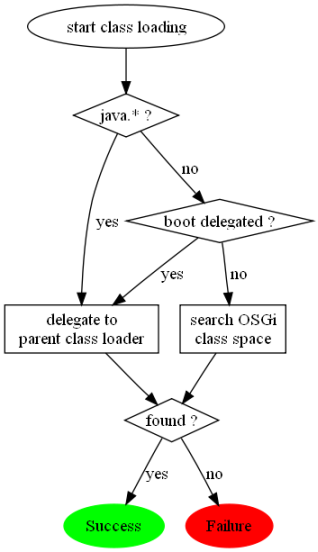 class loading delegation
This option is mainly created to accommodate various corner cases especially in the JDK classes that expect parent class loading delegation to always occur or that assume that every class loader on the system has full access to the entire boot path. Packages sun. and com.sun. are the two most common examples (as I've already mentioned) and for this reason some OSGi implementations (i.e. Equinox) enable them by default:
org.osgi.framework.bootdelegation=sun.*,com.sun.*
As a side note, Spring DM uses the same setting as well, by default, inside its integration testing framework (AbstractConfigurableOsgiTests#getBootDelegationPackages())
Each of the solutions above should work for most cases; however, I strongly recommend the A/A' approaches: they clearly express the bundle wiring and allow extensibility. The wiring is easy to control, detect and diagnose. Solution B acts as a bit of black magic since the bundle cannot control its loading and pick a certain version or provider since there is no class wiring in place. Moreover, the setting affects all bundles which might not be always what you want. Nevertheless, there are cases where boot delegation is quite handy; a good candidate being instrumentation, such as profiling or code coverage. The majority of tools use byte code weaving to add various counters or to intercept the execution flow. The 'instrumented' bundles cannot be loaded inside OSGi without updating their manifest since the newly added code refers to classes unknown to the bundle. Adding the custom packages to the boot delegation list offers a very quick way to instrument OSGi applications without having to change the packaging or the deployment process.
In this entry, I have referred to the parent class loader as the entity that loads and starts (or boots) the OSGi framework, following the terminology of the OSGi specification. It's worth noting that some OSGi implementations (specifically Equinox) allow customization of the parent class loader to different values (such as the application, boot or extension class loader).
P.S. There is no code listing for this entry but code aficionados can grab the graph definitions here.

VMware offers training and certification to turbo-charge your progress.
Learn moreTanzu Spring Runtime offers support and binaries for OpenJDK™, Spring, and Apache Tomcat® in one simple subscription.
Learn moreCheck out all the upcoming events in the Spring community.
View all